Addressing the Strained Supply of NVIDIA H100 SXM5 GPUs

Explosive Demand for H100 GPUs 

With the current boom in Generative AI, demand for enterprise graphics cards is at an all-time high, and NVIDIA is dominating the industry with an estimated market share of 90%. Accessing massive amounts of computing power to fuel training and inference has become a determining factor in how quickly AI products can be brought to market. No GPU model is in higher demand than NVIDIA’s new H100 SXM5 Tensor Core GPU. Boasting impressive performance improvements over its predecessor, NVIDIA’s A100 SXM4 GPU, the H100 is quickly becoming the most important asset in any company’s HPC infrastructure.  

The demand for NVIDIA H100s has drastically outpaced supply, with lead times for H100 nodes growing by the day. Arc’s current lead time for H100 SXM5 nodes is 10-14 weeks, meanwhile, NVIDIA is quoting 6+ months. As the first H100 clusters continue to deploy in the coming months, many companies will be stuck with their NVIDIA V100 and A100 chips for longer than expected. These companies will face the challenge of continuously innovating while utilizing older, slower hardware than some competitors. 

Saved by the Cloud? 

Many companies affected by the chip shortage that cannot promptly add H100 GPUs into their on-premises infrastructure will look to the cloud to fill the gap. Unfortunately, accessing H100s in the cloud is much easier said than done. Many organizations have already started looking to the cloud to fill the void that delayed shipments have left in their compute reservoirs, only to find that the supply shortage has also hindered CSPs. These shortages have resulted in cloud providers requiring longer contracts, large cluster commitments, upfront payments, and delayed deliveries. These stringent requirements have reduced the market’s competitiveness, as only companies with considerable capital can meet them. Sam Altman, the CEO of OpenAI, recently complained that a chip shortage was ‘delaying’ ChatGPT plans in a (now deleted) post. Luckily, ChatGPT has the backing of Microsoft. Through first-hand experience, it is evident that Microsoft used its weight to influence NVIDIA into reallocating paid-for orders designated to other organizations, satisfying OpenAI’s GPU appetite. 

So, what can you do if you can’t influence H100 allocations?  

Optimizing Your Current Hardware 

GPU utilization is a massive issue across various industries utilizing HPC infrastructure, with average utilization rates of just 20-30%. Optimizing GPU utilization through fractionalization would drastically increase performance, reducing the compute times of an organization’s accelerated hardware. This optimization would mitigate the need to acquire new H100s immediately. Implementing GPU fractionalization would enable better utilization rates by stacking tasks/jobs/workloads in the same GPU architecture.  

Optimization by Fractionalization with ArcHPC

Reworking your organization’s tech stack with GPU fractionalization can be achieved with a few different solutions available in the market (e.g. MIG, MPS, and vGPU). Unfortunately, these solutions vary in quality and can be difficult to implement, and they suffer from implicit synchronization issues. Synchronization issues occur when fractionalized workloads utilize the same CPU host, which sees the fractionalized workloads as one large job. When this is the case, a null execution line causes all workloads to be affected and synchronized, delaying task completion. ArcHPC, Arc’s GPU optimizing software suite for enabling complete GPU utilization and improved performance, doesn’t have this synchronization issue. ArcHPC solves implicit synchronization issues and enables task/job/workload matching on a deeper level than any other solution available. With ArcHPC fully integrated, you could halve your infrastructure needs by increasing GPU performance by 35-206%, reducing compute times drastically. 

A visual of where ArcHPC sits in the tech stack of HPC infrastructure

Conclusion 

Securing the best GPU resources will be challenging as the AI industry continues its explosive growth. With prolonged supply shortages for NVIDIA H100 GPUs, organizations must fully optimize their current HPC infrastructure to remain competitive. GPU fractionalization is the best technique for increasing GPU utilization and performance, but existing solutions suffer from inherent synchronization issues that reduce efficiency. ArcHPC has resolved these issues and offers organizations a truly optimized GPU utilization and performance solution.

GPU Utilization & Total Cost of Infrastructure Ownership

Under-utilized Resources

IT decision-makers must rapidly adapt to new frameworks and technologies to best serve their clients when building, managing, and optimizing on-premise infrastructure. One of the primary issues faced across industries is the under-utilization of computing resources, especially GPUs. 

When working with AI/ML models, considerable investments in GPU servers are required to provide the necessary environments for testing and training complex algorithms. These environments encompass hundreds to tens of thousands of GPUs, where teams aim to squeeze the most PetaFLOPs out of the underlying chipsets as possible. With an average GPU utilization of only 10%, key decision-makers have been wary of adapting to new HPC hardware as their current resources remain stagnant.

Are Job Schedulers the Solution?

Job schedulers, like SLURM, have been one of the only tools available for addressing utilization issues. They can be great tools for queueing and organizing jobs but fail at maximizing utilization. Greedy code, human error, and static resources plague job schedulers. Without intensive professional intervention, GPUs consistently remain under-utilized. These utilization issues can only be thoroughly addressed by Arc Compute’s GPU/CPU hypervisor, ArcHPC.

ArcHPC enables “Real Utilization” by addressing and repurposing idle/under-utilized compute resources, such as execution capabilities and VRAM during runtime, allowing up to 100% utilization as long as there are workloads available for processing. This translates into faster job training times with far less opportunity cost of idle resources. ARC HPC can be fully integrated under most job schedulers within an organization’s tech stack. 

Achieve 100% GPU utilization with ARC HPC

New & Improved GPUs

The explosive performance growth in NVIDIA’s H100s versus A100s and Intel’s Datacenter GPU Max Series breathes new excitement (and problems) into the world of Exascalers and supercomputers as they try to double, triple, quadruple, and quintuple PetaFLOPs. Breakthrough technology looks great, but many ask, “how do we ensure we get the most out of it given the total cost of ownership and technical investment requirements.” Spending hundreds of thousands of dollars on new GPUs can be hard to justify when overall utilization is so low.

The Solution: ArcHPC + Job Scheduler

For maximizing utilization, a job orchestration and scheduling tool is necessary to ensure a consistent funnel of work for HPC infrastructures but, without ArcHPC, you’re only addressing part of the underlying issue. Pairing a job scheduler with ArcHPC encompasses a complete solution for lowering the total cost of ownership of next-generation infrastructure and makes considerable investments far more justifiable to key decision-makers.  When both technologies are present in the tech stack, users can address both ends of the utilization problem, minimizing the complexity of job schedulers and maximizing the ROI of new hardware. 

Thanks to ArcHPC ensuring compute resources are automatically provisioned/re-provisioned, removing barriers to idle compute silos, it has never been easier to maximize utilization and lower the total cost of ownership of on-premise GPU-accelerated infrastructure. 

NVIDIA H100, H200, B200 PCIe vs. SXM5

The rise of generative AI and large language models has redefined what’s possible in enterprise computing, and it all started with the NVIDIA H100. As the first GPU to power commercially successful foundation models, the H100 laid the groundwork for a new generation of AI infrastructure.

Now, NVIDIA’s GPU ecosystem has expanded. The H200 offers a seamless upgrade path with more memory and bandwidth, while the B200, based on the cutting-edge Blackwell architecture, is just beginning to enter the market with unmatched performance for AGI-scale workloads.

But how do you choose the right GPU, and form factor, for your business? Let’s break down the capabilities, pricing, and ideal use cases of each.

H100: The Foundational Workhorse of Modern AI

The NVIDIA H100 Tensor Core GPU remains one of the most versatile and widely deployed GPUs for AI training and Inference. Available in both PCIe and SXM (via HGX systems), it offers a solid balance of performance, compatibility, and cost.

NVIDIA H100 PCIe Form Factor
  • Memory: 80GB HBM2e
  • Form Factors: PCIe and SXM
  • Peak FP8 Performance: Up to 4.9 PFLOPs (SXM)
  • Arc’s Availability:

Why Choose H100?

  • PCIe: Ideal for scalable Inference and modular deployments. Broad compatibility and lower entry costs make it great for startups and production-ready GenAI teams.
  • SXM (HGX): Designed for multi-GPU training. With NVLink and NVSwitch, up to 8 GPUs can share memory at high bandwidth, and HGX nodes can be networked for large-scale training.

H200: More Memory, More Bandwidth, Same Hopper Ecosystem

The NVIDIA H200 builds directly on the H100’s Hopper architecture but nearly doubles its memory and significantly boosts bandwidth, making it ideal for models with long context windows, larger batch sizes, and increased parameter counts.

NVIDIA H200 SXM5 Form Factor
  • Memory: 141GB HBM3e
  • Memory Bandwidth: 4.8 TB/s
  • Form Factors: SXM and NVL (dual-GPU PCIe variant)
  • Arc’s Availability:

Why Choose H200?

  • An ideal upgrade path from H100, especially if you’re already using HGX systems.
  • Designed for large model training, fine-tuning, and Inference at scale.
  • Same software stack and tools as H100—just with more horsepower.

B200: Peak Performance with Blackwell

Built on NVIDIA’s latest Blackwell architecture, the B200 represents a full generational leap. With 192GB of ultra-fast HBM3e memory and staggering performance figures, it’s designed for organizations training trillion-parameter models or operating real-time AI factories.

NVIDIA Blackwell Architecture
  • Memory: 180GB HBM3e
  • Peak Performance: Up to 72 PFLOPs (training), 144 PFLOPs (Inference)
  • Form Factor: SXM, part of HGX B200 and GB200 NVL72 systems
  • Arc’s Availability:

Why Choose B200?

  • Perfect for hyperscalers, cloud platforms, and advanced research labs.
  • Only GPU that rivals full-node performance for trillion-parameter workloads.
  • A future-proof investment for AGI-scale infrastructure.

PCIe vs. SXM: Which Form Factor Is Right for You?

Choosing between PCIe and SXM is just as important as selecting the right GPU. Each form factor offers different advantages depending on workload type and scalability requirements.

PCIe vs. SXM: Which Form Factor Is Right for You?

TL;DR:

  • Use PCIe for inference tasks, experimentation, or when cost and compatibility are top priorities.
  • Use SXM (HGX) when training massive models that need fast GPU-to-GPU communication and pooled memory.

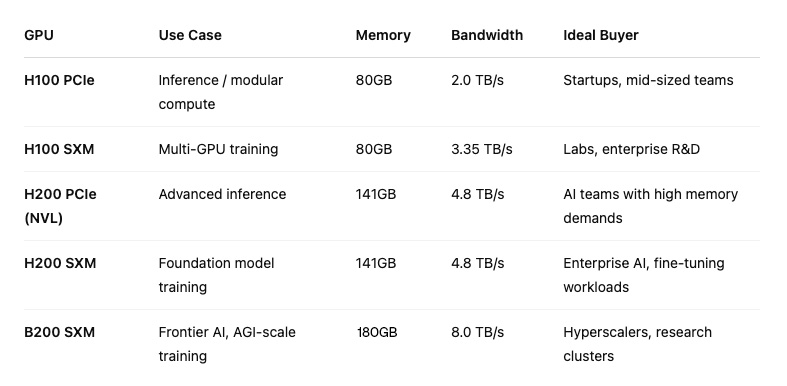
Comparison Table

Comparing H100, H200, & B200

Conclusion

Whether you’re training your first foundation model or scaling a global AI platform, NVIDIA’s GPU ecosystem has a solution tailored to your goals:

  • H100 offers the best entry point for real-world AI workloads, now available through both on-prem servers and Arc’s Reserved H100 Cloud.
  • H200 gives you more memory, bandwidth, and scalability—perfect for model growth and training performance.
  • B200 is the GPU of the future, ready today for companies building at the bleeding edge of AI.

Need help deciding which GPU and form factor is right for you? Our team at Arc Compute is here to help. We’ll walk you through hardware choices, cloud deployments, and colocation options—all tailored to your workload and budget. Email us at sales@arccompute.io or fill out our Contact Us form.

Addressing Utilization Issues with GPU Job Schedulers

A GPU Job Scheduler is a tool that manages and schedules the allocation of GPUs in a cluster environment. They enable the efficient utilization of GPU resources by allocating them to the jobs that need them. Schedulers also provide a unified interface for submitting, monitoring, and controlling the execution of GPU jobs in clusters. Although schedulers can be very useful to Systems Administrators, they have drawbacks when it comes to maximizing utilization and performance.‍

The Top 4 Utilization Issues with GPU Job Schedulers

1. How Schedulers measure and report utilization:
Schedulers measure and report utilization in terms of VRAM assignment, meaning they’re susceptible to cores and execution capabilities being over-provisioned to jobs that don’t require as many resources due to unoptimized code eating up more VRAM than it should.

2. Schedulers only suggest fixes to improve utilization:
When optimizing utilization, schedulers only give suggestions and ideas of what jobs should be reviewed, resized, and re-coded. It is then up to the user to implement these fixes on an ongoing basis.

3. Limited virtualized GPU partitioning capabilities:
Virtualizing GPUs and partitioning them into smaller vGPUs can drastically increase utilization, thanks to multi-tenancy. Current legacy virtualization tools like MIG, used by job schedulers, max out at seven slices per GPU and can only attach a single slice to a virtual machine. MIG is also only available for NVIDIA A100 and H100 GPUs.

4. No live resizing/redistribution of VRAM:
Schedulers cannot resize VRAM at runtime for jobs that would benefit from increases or be unfazed from decreases, resulting in missed opportunities for expedited job queue completions due to under utilized VRAM.

How Arc Compute Addresses these Issues

1. How schedulers measure utilization:
Arc Compute’s hypervisor, ArcHPC, can move cores and execution capabilities where they need to be during runtime, eliminating instances of under utilized or unused cores and execution capabilities. This feature, called Simultaneous Multi-Virtual GPU (SMVGPU), enables 90%-100% utilization of cores and execution capabilities, drastically expediting job completion times.

2. Schedulers only suggest fixes to improve utilization:
ArcHPC doesn’t report suggestions to resize, recode, or review jobs based on their utilization numbers as our technology optimizes during runtime automatically, fixing any issue jobs face while sharing the same underlying hardware. ArcHPC eliminates the need to report on ways to improve utilization as it automates the process without the need for human intervention.

3. Limited virtualized GPU partitioning capabilities:
Unlike MIG, which is limited to a maximum of 7 slices per GPU, ArcHPC + SMVGPU has no limit and can slice a GPU into an arbitrary number of vGPUs for multi-tenancy. It can size/resize and split without limitations. ArcHPC can also attach multiple virtualized slices from numerous GPUs into a single VM and is not limited to MIG-enables GPU models.

4. No live resizing/redistribution of VRAM:
ArcHPC will soon feature VRAM reallocation at runtime for workloads sharing GPU without needing to reboot. This feature will increase utilization and performance even more.

View comparison showing how MIG and SMVGPU differ when training multiple jobs on a single GPU

Conclusion

GPU Schedulers are complementary to ArcHPC for optimizing GPU utilization with VRAM assignment and ensuring that organizations consistently have jobs provisioned to their compute clusters. However, to address the missed opportunities in the over-provisioning of cores and execution capabilities due to poor code, the limitations of MIG, and VRAM resizing in GPUs across nodes and clusters, ArcHPC is the only solution available.

ARC HPC's location in the data center tech stack.

While the premier version of ArcHPC doesn’t completely replace all of the functionalities of a GPU Scheduler, it sits below them in the data center tech stack, meaning that a Scheduler can be seamlessly integrated into ArcHPC.

Experience Better GPU Performance with ArcHPC

The Short Answer:

ArcHPC & Simultaneous Multi-Virtual GPU (SMVGPU)

ArcHPC, Arc’s GPU optimization software suite, has an exclusive feature called Simultaneous Multi-Virtual GPU (SMVGPU). SMVGPU enables the virtualization of multiple multiplexed virtual GPUs into a single virtual machine, something that no other hypervisor can do. This, along with its superior ability to allocate GPU memory at run-time* (more on this at the end of the post), means that when you’re utilizing virtual GPUs in the Arc cloud you’ll always be allocated the amount of resources you signed up for, but you’re often allocated even more. To illustrate this let’s take a look at an example.

Example:

Let’s say you need access to 2 x A100 40 GB GPUs to train a complex neural network model. The standard way to do this is to reserve a cloud instance (VM) with 2 full A100 GPUs passed into it. This configuration is shown in Configuration 1 below. You’ll get this type of configuration with any other cloud provider.

Configuration 1

Configuration 1

If you were to require 2 x A100 40 GB GPUs in the Arc cloud, you wouldn’t be allocated just two graphics cards. Instead, you would be allocated 4 half vGPUs (half a multiplexed virtual GPU). This configuration is illustrated in Configuration 2.

 Configuration 2

Configuration 2

You’re allocated the exact same amount of resources in both situations (the equivalent of 2 x A100 40 GB GPUs), but you’re limited to just the resources of those two cards in Configuration 1. This isn’t the case for Configuration 2. Thanks to ArcHPC’s ability to allocate GPU resources at run-time, assuming the other halves of the 4 cards you’re using aren’t being utilized (or are being under-utilized) by someone else’s workloads, you’ll actually be allocated some of the resources of those halves as well. Due to the staggered nature of workloads (especially across different time zones), you’ll be allocated more resources than you signed up for 99% of the time, which increases performance and reduces the time it takes for your workload to run.

An added bonus of this performance boost in the Arc cloud is that you can often get away with using fewer GPU resources than you’re used to. In the above example of needing 2 x A100 40 GB GPUs to train your workloads, you would likely only need 1 x A100 40 GB vGPU in the Arc cloud (AKA 2 half virtualized GPUs) (assuming someone else’s workloads aren’t fully utilizing the other halves of those GPUs). 

*ArcHPC’s allocation of GPU resources at run-time is more advanced than other hypervisors due to its ability to virtualize GPUs into more complex configurations. With multiple multiplexed virtual GPUs passed through into a single VM, that instance will benefit from the load-balanced resources across all GPUs that it’s utilizing (including any part of the GPUs that it’s not technically allocated)