The Agentic AI Infrastructure Blueprint: Bridging the Gap from Pilot to Production in 2026

Most enterprises have a successful pilot. Few have the runway for a successful takeoff in production. Here’s what infrastructure breaks and what to build instead.  

‍It’s a much too familiar scene. The AI pilot is done. The demo ran perfectly.  

‍Executives nodded. Someone said ‘transformational.’ Someone else declared the pilot ready to launch.  

‍The executive meeting ended on an enthusiastic note.  And then nothing. Six months later the project comes to a standstill, seemingly forever entrapped in evaluation mode.  

‍Meanwhile, the data science team moved on to the next pilot. The vendor is following up weekly but there’s not much progress to share. And somewhere in IT, a server is doing pretty much nothing other than running up a very large bill. 

‍You’re in good company if this is your story.  

‍The majority (68%) of enterprises are now running at least one AI agent pilot but only 24% are scaling AI to production. The much-coveted agentic AI that can autonomously or semi-autonomously run business processes remains elusive for most companies despite heavy investment and substantial effort. The primary reason the pilot fails to take flight in production, for them or you, isn’t the model. It’s in the infrastructure shortcomings of the runway. 

Why Agentic AI Breaks Your Pilot


Most enterprise AI pilots are built in a straight line” prompt in, answer out.  That model collapses the minute you introduce AI agents. Agents plan, retrieve data, call tools, make decisions, execute, check results, and keep going. You’re no longer managing a response. You’re running a system.  


And that system stresses everything.

Latency isn’t a single metric anymore. It stacks across every step in the chain. A workflow that looks fast in isolation slows to a crawl by step five and can bog down entirely by step seven. State has to persist, which pushes memory and session management into production concerns, rather than afterthought refinements. And cost stops being per request, it becomes per workload, per loop, per decision point. Let unchecked, it scales faster than your budget controls.  

None of this shows up in the pilot.  

Pilots are designed to succeed. Clean data, narrow scope and minimal integration. There’s no real permissioning complexity and no latency drag either.  They carefully ignore legacy systems and, nope, can’t seethose seven data lakes with conflicting schemas either. In short, they completely avoid the conditions that define production.

That’s the gap.

Salesforce EMEA AI Architect leader Franny Hsiao calls this the ‘pristine island’ trap: “pilots frequently begin in controlled settings that create a false sense of security, only to crumble when faced with enterprise scale.”

Agentic AI doesn’t break your pilot, real-world conditions do. What it exposes is a test environment that avoided the very constraints that agents now have to run under.

‍‍The 2026 Hardware Reality That Nobody Budgeted For


Agentic AI doesn’t run on pilot infrastructure. It requires production-grade AI systems, and in 2026, most enterprises don’t have the hardware to support it. In many cases, they can’t get it in a reasonable timeline.  

The constraints are structural:

Compute: Lead times are running 36 to 52 weeks for data-center hardware. This is not a shipping hiccup; it’s a structural global shortage. GPU capacity is effectively pre-allocated. Hyperscalers have locked in supply for years ahead and lead times for high-end accelerators stretch close to a year. If you’re planning to procure the necessary compute power on the open market this quarter, bring a book or maybe three to occupy the time you’ll wait.

Memory: High-bandwidth memory (HBM) is sold out through 2026 across all major suppliers. This is the biggest bottleneck. HBM is constrained across the entire supply chain, and agentic systems depend on it to sustain continuous inference. The practical consequence: agentic AI systems are not GPU-constrained. They are memory constrained. When the memory throughput lags, the entire workflow stalls, regardless of how much compute you have provisioned.

Power: A fully loaded AI rack now draws 50 to 150 kilowatts. Infrastructure limits hit fast. Modern AI racks draw far more power than traditional enterprise environments were designed to handle. Past a certain point, air cooling fails and liquid cooling becomes mandatory. Most existing facilities weren’t built for this density and retrofitting is non-trivial. If your facility was built for general enterprise IT, it almost certainlycannot run a production agentic AI cluster without major capital investment or a new building.

This isn’t a procurement issue. It’s a capacity problem: what enterprise infrastructure can actually deliver today falls far short of what agentic AI requires.

‍‍The Agentic AI Infrastructure Blueprint: What Actually Matters


Companies that have successfully moved from pilot to production aren’t necessarily spending more. They’re spending their money differently and more strategically. They stop optimizing models and start building the environments the models have to survive in.  

In other words, they prioritize the operational layers that agentic workloads demand over additional model experimentation. The stack shifts in five places:

Compute (built for inference, not experiments): Agentic workloads  don’t tolerate bursty, shared GPU setups. They require tightly coupled clusters GPU clustering with sufficient memory bandwidth to sustain continuous inference.  A good example is NVLink interconnect and HBM3e or HBM4 per card, sized for continuous inference instead of for occasional training bursts. Consider dedicated inference accelerators (LPU-class) for inference optimization and latency-critical agent paths. If your architecture is sized for training jobs, it will stall under agent workloads.

  • Storage (latency is the restraint): Agentic agents live and die by retrieval speed. If storage can’t keep up, the entire workload degrades. This is where many designs fail.  Spinning disks brings with them afatal latency that breaks the real-time RAG lookups that feed multi-step reasoning chains. If your agent has to wait on a hard drive at any step or at each step, you have already lost.
  • ‍Thermal and power density (design for it upfront): At the densities required for agentic GPU clustering, air cooling is not an option, nor does it pass the physics test. The facility must support liquid cooling before the hardware arrives, not after the first thermal shutdown.
  • ‍Orchestration (this is the system): The model is no longer the product, the workflow is. This is what separates agentic infrastructure from a chatbot. You need stateful orchestration that can manage multi-step, multi-agent execution, with visibility and controls at every hop. Without that, failures cascade and debugging becomes guesswork.
  • ‍Governance (not optional): Agentic systems act semi-autonomously or autonomously. That means identity management, permission scoping, and audit trails per agent action. With the EU AI Act fully enforceable as of August 2026, this is a compliance requirement, not an architectural preference.


‍The pattern remains consistent; the model is never the bottleneck. The environment is.

‍‍Building for Agentic AI Before You Need It


‍The teams successfully getting to production aren’t the ones running more pilots. They’re the ones treating agentic AI as an infrastructure decision early, before scale exposes the gaps.

Arc Compute is purpose-built for this transition.  

Instead of competing for constrained, general-purpose cloud capacity, Arc Compute provisions dedicated GPU clusters designed for sustained inference workloads instead of for intermittent experimentation. That includes high-bandwidth memory configurations sized for multi-step agent workflows, and interconnects that avoid the latency penalties common in loosely coupled environments.

Data is co-located with compute to eliminate retrieval bottlenecks that break agent chains. Storage and inference sit in the same performance envelope, so agents aren’t waiting on external systems mid-execution.

At the facility level, Arc Compute environments are engineered for high-density AI workloads from the start. Power delivery, liquid cooling, and rack design are aligned to the realities of modern GPU clusters by design and with purpose. They are not retrofitted after instability appears to wreck your progress.

On top of that, Arc Compute builds the orchestration layer required to run agentic systems in production: stateful workflow management, GPU-aware scheduling, and end-to-end visibility across agent pipelines so failures can be isolated before they cascade.

The point isn’t that the pilot worked. It’s that production won’t without a different, purpose-built foundation.

If you’re planning to move beyond isolated use cases into real agentic systems, the constraint won’t be models. It will be whether your infrastructure can support them. Arc Compute is designed to close that gap before it shows up in production by providing as much or as little hardware and support as you may need.

Source List:

  1. KPMG AI Quarterly Pulse Survey Q4 2025 https://kpmg.com/kpmg-us/content/dam/kpmg/pdf/2026/ai-quarterly-pulse-survey-am-pe-q4-2025.pdf
  2. AI News: https://www.artificialintelligence-news.com/news/franny-hsiao-salesforce-scaling-enterprise-ai/    
  3. SemiAnalysis newsletter on Substack https://newsletter.semianalysis.com/p/the-great-gpu-shortage-rental-capacity
  4. Post by Barrack AI founder, Dhayabaran V  https://blog.barrack.ai/2026-gpu-memory-crisis/
  5. Datacenter.com: https://www.datacenters.com/news/ai-cooling-systems-must-support-100-kw-racks

Why Investors Are Shifting From AI Startups to AI Infrastructure

Artificial intelligence has triggered one of the largest capital investment cycles in modern technology. Venture funding has flowed into AI startups building foundation models, generative AI platforms, and specialized applications across industries.

‍At the same time, a more structural shift is taking place in the background. Increasingly, investors and infrastructure operators are directing capital toward the compute layer that enables AI, rather than focusing exclusively on software companies.

‍The scale of infrastructure spending by major technology companies illustrates this trend. Hyperscalers such as Amazon, Microsoft, Alphabet, and Meta are investing heavily in GPU capacity and data center expansion to support AI workloads. Meta alone has announced capital expenditure plans between $115 billion and $135 billion for 2026, with a significant portion allocated to AI infrastructure.

‍For investors and technology leaders, these signals point to an important conclusion: the long-term growth of the AI ecosystem depends heavily on compute infrastructure.

The Infrastructure Layer of the AI Economy

‍Most conversations about AI focus on models and applications. Large language models, generative AI tools, and enterprise AI platforms typically receive the most attention. However, these systems depend on a foundational infrastructure layer.

‍Training large-scale models requires clusters of GPUs capable of performing massive parallel computations. Running production AI workloads requires infrastructure that can deliver consistent performance for inference across distributed environments.

‍The modern AI stack therefore depends on several critical components:

  • High-performance GPU clusters
  • AI-ready data centers with sufficient power density and cooling
  • High-bandwidth networking infrastructure
  • Storage systems optimized for large-scale AI workloads

Designing and operating this infrastructure requires significant expertise. Hardware procurement, cluster configuration, data center placement, and workload management all play a role in determining whether infrastructure performs efficiently.

‍For organizations building AI platforms, access to reliable compute is often the primary operational constraint.

‍Why Infrastructure Is Attracting Investor Interest

‍Investing in AI startups can deliver substantial returns, but it also introduces significant uncertainty. Many companies face extremely high training costs, evolving model architectures, and intense competition from well-funded technology firms. Infrastructure investments offer a different exposure to the AI market.

‍Demand for compute exists regardless of which AI startup ultimately succeeds. Every organization developing AI models requires GPU capacity. Enterprises deploying AI systems require infrastructure capable of supporting large-scale training and inference workloads.

As a result, infrastructure investments can support multiple companies and workloads simultaneously, rather than relying on the success of a single organization.

‍This strategy resembles earlier technology cycles. During the rise of cloud computing, infrastructure providers became foundational to the entire digital economy. AI infrastructure appears to be following a similar pattern.

‍For investors, compute capacity represents a way to participate in the growth of AI while reducing exposure to the volatility associated with early-stage software companies.

AI Infrastructure in Practice

‍A recent deployment illustrates how this investment model works in practice.

HAL 9000, a subsidiary of a private investment group, partnered with Arc Compute to deploy a high-performance GPU cluster across U.S. data centers. Instead of allocating capital to individual AI startups, the organization focused on infrastructure capable of supporting a wide range of AI workloads. For infrastructure leaders exploring similar deployments, read the full case study for a detailed look at how the cluster was deployed and monetized.

‍The deployment timeline was rapid. The GPU cluster became operational within approximately five days, and compute capacity began generating revenue within 24 hours of activation.

‍Within days of going live, utilization exceeded 90%, demonstrating strong demand for reliable GPU infrastructure from organizations running AI workloads.

‍This model allowed the investment group to gain exposure to the broader AI market while supporting multiple customers building AI systems.

For infrastructure leaders exploring similar deployments, read the full case study for a detailed look at how the cluster was deployed and monetized.

Infrastructure Economics and Utilization

‍The economic viability of AI infrastructure depends heavily on utilization rates.

‍GPU clusters represent a significant capital investment. If infrastructure remains idle, the cost of hardware, power, and data center capacity quickly erodes returns.

‍Successful infrastructure deployments therefore focus on several key factors:

  • Strategic data center placement
  • Efficient cluster configuration
  • Rapid deployment timelines
  • Access to consistent compute demand

When these elements align, infrastructure can support a broad ecosystem of workloads and maintain high utilization levels.

‍This is why infrastructure operators increasingly focus not only on hardware procurement, but also on deployment strategy and workload access.

The Next Phase of AI Development

‍The initial phase of the AI boom has been driven primarily by breakthroughs in models and applications. The next phase will likely be defined by infrastructure scalability.

As organizations adopt AI across more functions, demand for compute will continue to grow. Larger models, real-time inference systems, and enterprise AI platforms all require substantial infrastructure capacity.

‍This is already visible in the expansion of AI data centers, GPU cluster deployments, and specialized infrastructure platforms designed to support AI workloads.

‍For CTOs and infrastructure leaders, this shift raises important strategic questions around how compute capacity should be sourced, deployed, and managed.

‍For investors, it highlights the growing importance of infrastructure as a foundational component of the AI economy.

Conclusion

Artificial intelligence may be driven by algorithms and models, but its progress ultimately depends on the infrastructure that powers them.

‍GPU clusters, AI-ready data centers, and scalable compute platforms are becoming essential components of the modern technology stack. As demand for AI continues to expand, infrastructure will play an increasingly central role in enabling innovation.

For this reason, many investors are beginning to shift their focus from individual AI startups toward the infrastructure that supports the entire ecosystem.

In the long term, the organizations that build and operate the compute layer of AI may prove just as influential as those developing the models themselves.

Beyond Blackwell: Preparing Enterprise Data Centers for the NVIDIA Rubin Architecture and the HBM Crunch

Every major NVIDIA architecture transition forces a decision point for enterprise AI teams. The shift from Hopper to Blackwell was disruptive enough. What comes next is going to be harder. 

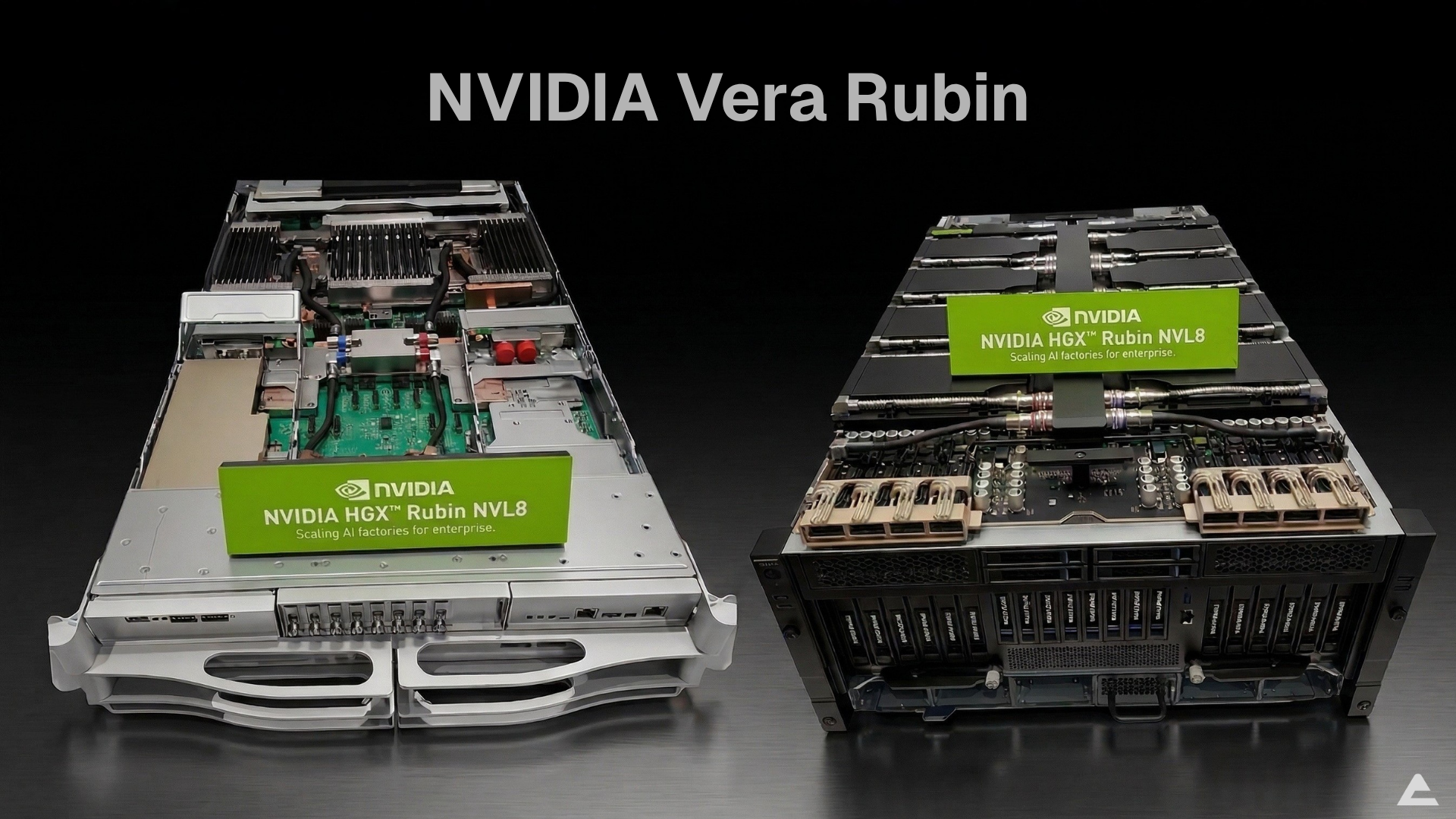
‍NVIDIA’s Vera Rubin platform is no longer a roadmap item. At GTC 2026, Jensen Huang confirmed that the first Vera Rubin rack is already up and running at Microsoft Azure, with full production shipments targeting the second half of 2026. This is a full platform redesign: new GPU architecture, a custom ARM-based CPU (Vera), HBM4 memory, NVLink 6 interconnects, and a new Groq inference accelerator tightly integrated into the system. 

‍For data center operators, ML infrastructure leads, and CTOs planning 12 to 18 months out, the question is no longer whether Rubin is coming. It is whether your facility, your procurement pipeline, and your thermal envelope can handle it. 

‍And sitting underneath all of it is a supply constraint that most teams have not fully accounted for the HBM memory crunch

What We Know About Vera Rubin 

‍NVIDIA has progressively disclosed the Rubin roadmap across GTC conferences and public briefings from 2024 through 2026. At GTC 2026, Huang laid out concrete specs and confirmed production timelines. Here is what we know: 

Vera Rubin NVLink 72: 3.6 exaflops of compute and 260 TB/s of all-to-all NVLink bandwidth. This is the core AI training and inference system, designed as a complete rack-scale computer with 72 GPUs connected via NVLink 6. 

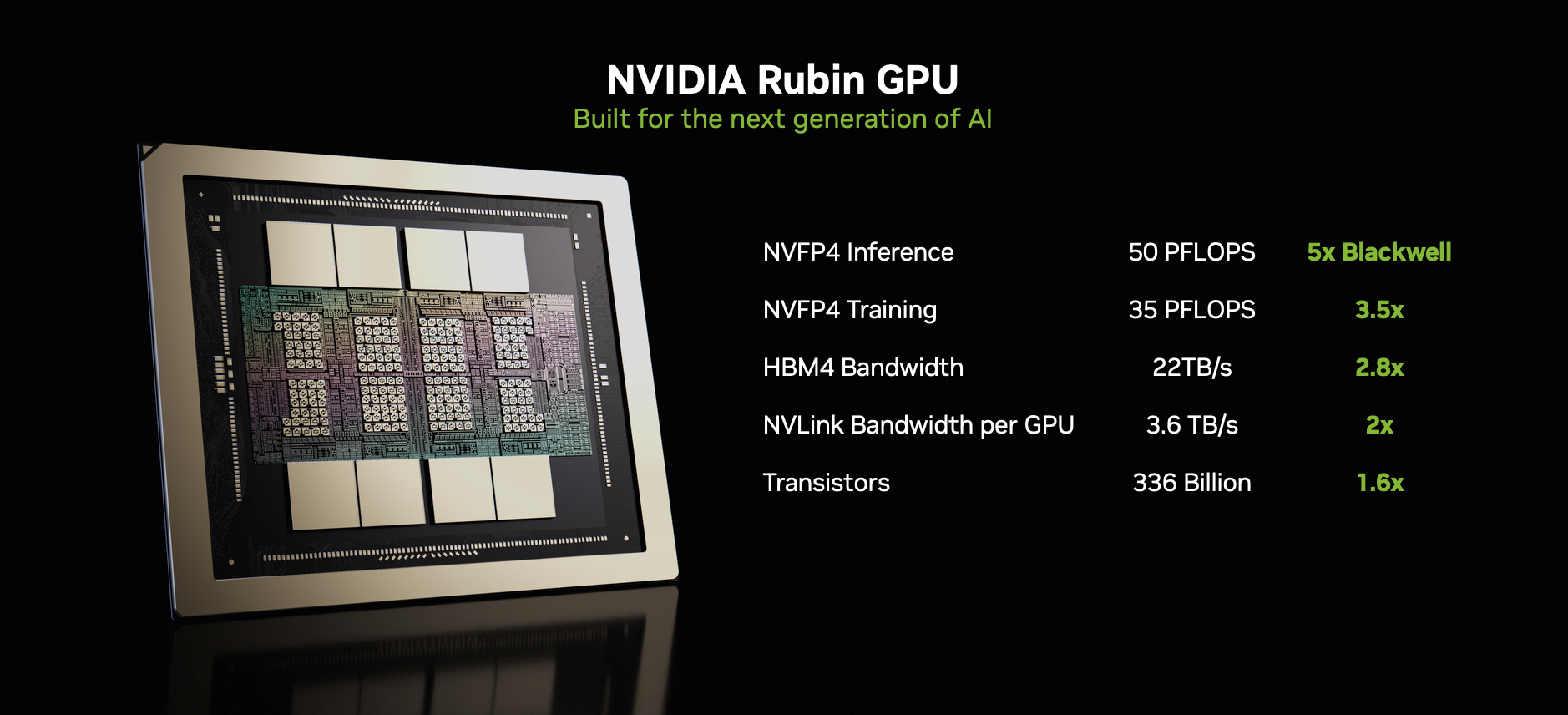
Rubin GPU (R100): The next-generation data center GPU succeeding the B200/B300 Blackwell series. Uses HBM4 memory for a generational jump in memory bandwidth and AI throughput. 

Vera CPU: NVIDIA’s custom ARM-based CPU designed for orchestration and agentic workloads. Uses LPDDR5 for extreme energy efficiency. Already shipping standalone and confirmed as a multi-billion dollar business line for NVIDIA. 

NVLink 6: Sixth-generation scale-up interconnect. Doubles bandwidth over NVLink 5. Fully liquid-cooled. NVLink Fusion extends connectivity to third-party CPUs and DPUs. 

Groq LP 30 integration: A deterministic dataflow inference accelerator with massive on-chip SRAM, tightly coupled to Vera Rubin via Dynamo software. Together, they deliver 35x more throughput per megawatt compared to Blackwell. Samsung manufactures the Groq LP 30 chip, already in production. 

Rubin Ultra: A higher-end variant using the new Kyber rack design, which connects 144 GPUs in a single NVLink domain. The chip is currently taping out, with availability expected to follow the initial Vera Rubin production run. 

‍Huang also disclosed that NVIDIA now sees at least $1 trillion in committed demand through 2027, up from $500 billion at GTC 2025. The inference inflection point, as he framed it, is driving this: AI workloads have shifted from primarily training to production inference at scale, and the compute demand per token has grown roughly 10,000x in the past two years.

Blackwell vs. Vera Rubin: What Changes 

Specification Blackwell (B200/B300) Vera Rubin (R100)
GPU Architecture Blackwell Rubin
Memory Type HBM3e HBM4
Memory per GPU Up to 288 GB (B300) 288 GB
System Compute (NVL72) ~1.8 exaflops 3.6 exaflops
NVLink Bandwidth 130 TB/s all-to-all 260 TB/s all-to-all
Interconnect NVLink 5 NVLink 6
CPU Pairing Grace (ARM) Vera (ARM, LPDDR5)
Inference Accelerator N/A Grok LP 30 (SRAM-based)
Cooling Liquid (hybrid) 100% liquid, 45C hot water
Throughput vs. Blackwell Baseline 35x per megawatt (with Grok)
Status Shipping (production) Sampling at Azure; H2 2026 production

The HBM Crunch: Why Memory Is the Real Bottleneck

Most enterprise teams worry about GPU cost or power draw when planning for next-gen systems. Those are real concerns. But the constraint that will hit hardest, and that most teams are not planning for, is HBM supply.

HBM4 is architecturally different from previous generations. Unlike HBM3e, where the memory supplier handled nearly all manufacturing, HBM4 uses a logic base die produced by the GPU vendor (NVIDIA or its fab partner), with DRAM stacks built on top by the memory maker. This joint-manufacturing model adds complexity to an already constrained supply chain.

‍Here is why the supply picture looks tight:

  • Production ramp takes time. SK Hynix, the leading HBM supplier, has targeted HBM4 mass production for the second half of 2025, with volume shipments aligning to NVIDIA’s Rubin timeline. But “mass production” and “enough to meet global demand” are two different things. HBM3e was constrained well into 2025 despite shipping since late 2023.
  • Yield challenges are real. HBM4 stacks are taller and denser than HBM3e, with 12 to 16 high-interface layers. More layers mean more bonding steps and more chances for defects. Early yields on new HBM generations have historically been low, directly capping usable output.
  • Demand is not slowing. At GTC 2026, Huang stated NVIDIA sees at least $1 trillion in infrastructure demand through 2027. Every major cloud provider, every hyperscaler, and every sovereign AI initiative is competing for the same limited pool of HBM. TrendForce projected the HBM market would grow over 100% year-over-year in 2025, and 2026 demand stacks on top of that already inflated base.
  • Lead times lock in allocations early. NVIDIA allocates GPU systems based on committed purchase volumes, often 6 to 12 months before delivery. Organizations not already in the procurement pipeline for Vera Rubin systems could be looking at 2027 delivery dates.

HBM Evolution: Generational Comparison

HBM Memory Bandwidth Evolution (Per Stack)

HBM2e A100 era
~460 GB/s
HBM3 H100 era
~819 GB/s
HBM3e B200/B300
~1.2 TB/s
HBM4 R100 (Rubin)
~1.5+ TB/s (est.)

Throughput per Megawatt by GPU Generation (Relative)

1x
Hopper H100/H200
35x
Blackwell B200/B300
35x more
Vera Rubin + Groq LP 30

Source: NVIDIA GTC 2026 keynote, Semi Analysis inference benchmarks. Relative throughput per megawatt at premium inference tier.

What Data Center Teams Need to Plan for Now

Vera Rubin is already sampling. Production racks are shipping in the second half of 2026. Your planning window is not opening; it is closing. Here is what needs to be on the roadmap.

Power and Cooling

Blackwell pushed per-rack power density past 40 kW, with some DGX configurations reaching higher. Vera Rubin systems are 100% liquid-cooled, designed for 45-degree hot water cooling. This is not optional. The entire cable management and installation process has been redesigned around liquid cooling, with NVIDIA claiming rack installation time has dropped from two days to two hours.

‍For most enterprise data centers built in the last decade, air-cooled infrastructure will not be sufficient. Direct-to-chip liquid cooling becomes a baseline requirement. Facilities teams should be evaluating cooling retrofit options now, because the lead time on cooling infrastructure can be 6 months or more.

Rack and Floor Space

Higher compute density means fewer racks to deliver the same total compute, but each rack demands more power delivery, more cooling capacity, and more robust structural support. The new Kyber rack design for Rubin Ultra introduces vertical compute node insertion with a midplane architecture, replacing traditional cabling with integrated backplane connections. These are different physical form factors than what most enterprise data centers run today.

Network Fabric

NVLink 6 and the Spectrum X ecosystem will push data centers toward 800G Ethernet with co-packaged optics. NVIDIA confirmed at GTC 2026 that it is the only company currently in production with CPO (co-packaged optics) switch technology, manufactured with TSMC. Most enterprise networks today run 100G or 400G. Upgrading switch infrastructure, cabling, and optics is a multi-quarter project.

Procurement Strategy

This is where the HBM supply constraint turns from a market trend into a direct business problem. GPU systems equipped with HBM4 will have constrained availability for the first 12 to 18 months after launch. NVIDIA has built a supply chain capable of manufacturing thousands of racks per week, but demand visibility already sits at $1 trillion through 2027. Organizations that take a wait-and-see approach will find themselves at the back of the allocation queue.

Smart procurement means engaging with GPU infrastructure partners early, locking in allocation commitments ahead of production, and planning for phased deployments rather than trying to place one large order after systems become generally available.

The Ownership vs. Cloud Decision Gets Sharper

Every GPU architecture transition restarts the debate: should we own our compute infrastructure or rent it from a cloud provider?

‍With Vera Rubin, the economics tilt further toward ownership for organizations running sustained AI workloads. At GTC 2026, Huang framed this explicitly around what he called “token factory economics“: every data center is now an AI factory, and its output is measured in tokens per watt. Power is the fixed constraint. The infrastructure you put inside that power envelope determines your revenue potential.

Cloud GPU pricing will spike at launch. Cloud providers face the same HBM supply constraints as everyone else. When Vera Rubin instances appear on AWS, Azure, or GCP, pricing will reflect scarcity for the first 12 to 18 months.

Sustained workloads favor CapEx. If your team is running inference around the clock or training on multi-week cycles, the total cost of ownership on purpose-built hardware breaks even with equivalent cloud spend in roughly 12 to 18 months. Beyond that, savings compound. This has been consistently true since Hopper, and the economics widen with each new generation.

Data residency requirements keep expanding. GDPR, HIPAA, PCI-DSS, the EU AI Act, and similar frameworks across the Middle East and Asia-Pacific continue tightening rules around data processing location. For finance, healthcare, and government workloads, on-premises GPU infrastructure is increasingly the default compliance path.

‍Cloud still makes sense for burst capacity, early experimentation, and disaster recovery. But for production AI at sustained scale, the trend toward infrastructure ownership is hard to ignore.

Planning GPU Infrastructure for the Next Cycle

The Blackwell-to-Rubin transition is going to separate organizations that planned ahead from those that reacted. Planning does not just mean setting a budget line for new GPUs. It means aligning your facility capacity, network readiness, cooling infrastructure, and procurement timeline to a delivery window that is tightening by the quarter.

‍This is the kind of infrastructure transition that benefits from working with a partner who operates at the hardware system level. Arc Compute specializes in purpose-built, on-premises GPU systems for AI workloads, working with enterprise teams to align hardware procurement, facility readiness, and deployment timelines so that when systems ship, they go into production in weeks rather than months.‍

A Practical Timeline for Enterprise Teams

Enterprise Vera Rubin Readiness Timeline

Q1-Q2 2026

Assess and Audit

Evaluate power, cooling, and network capacity. Identify gaps for liquid-cooled, high-density racks. Start GPU partner conversations on allocation.

Mid 2026

Commit and Upgrade

Lock procurement commitments. Begin liquid cooling retrofits. Upgrade to 800G-ready network with CPO support.

H2 2026

Deploy and Validate

Receive Vera Rubin systems. Benchmark against existing workloads. Begin phased production deployment.

2027

Scale Out

Full production scale. Evaluate Rubin Ultra (Kyber rack, 144 GPU NVLink domain) for next expansion.

The Bottom Line

Vera Rubin is not another GPU refresh. It is a platform shift that touches memory technology, interconnect architecture, CPU design, cooling requirements, and power delivery all at once. The HBM4 supply crunch adds a procurement and timing dimension that pure performance planning does not account for. The preparation window is open. It will not stay open long.

Jensen Huang’s GTC 2026 Keynote: The $1 Trillion AI Factory Era Has Arrived

The Inference Inflection Point Is Real, and It’s Already Here

Jensen spent real time explaining why demand has multiplied so dramatically. His argument comes down to three back-to-back breakthroughs: ChatGPT unlocked generative AI, OpenAI’s o1 made that AI trustworthy through reasoning, and then Claude Code arrived as the first truly agentic model, one that reads files, compiles code, tests it, evaluates results, and iterates without hand-holding.

Each step compounded the compute requirement. Reasoning models use far more input tokens for context and more output tokens for thinking. Agentic models run in continuous loops. The result, by Jensen’s math: compute demand for AI work has gone up roughly 10,000 times per task, while usage volume has gone up around 100 times. He’s saying compute demand has effectively multiplied by a million in two years.

‍You can debate the precision of that number. You can’t really debate the direction.

‍At Arc Compute, we see this demand firsthand. Customers who were running exploratory workloads 18 months ago are now running production inference at scales they didn’t plan for. The infrastructure decisions you make today have a very short lead time before they hit revenue.

Vera Rubin: 35x More, and Jensen Thinks You’re Still Thinking Too Small

‍The flagship announcement was Vera Rubin, a complete re-architecture of NVIDIA’s compute platform built specifically for the agentic AI era. The headline numbers are 3.6 exaflops of compute and 260TB/second of all-to-all NVLink bandwidth in a single NVLink 72 domain.

But Jensen’s more interesting point wasn’t the raw specs. It was the factory economics argument.

‍He introduced what he calls the Token Factory framework: every data center has a fixed power budget, and every watt you don’t convert to tokens is revenue you left on the table. He walked through a simple four-tier model (free, medium, high, premium) at different token speeds and prices ($3/million up to $150/million), and showed that moving from Blackwell to Vera Rubin at the same power envelope could generate roughly 5x the revenue. Not 5x the compute. 5x the revenue.

‍That’s the reframe. Your GPU cluster is no longer a cost center. It’s a token factory, and the output is your product.‍‍‍

The Groq Integration: When Two Extremes Work Better Together

‍One of the more technically interesting announcements was the Groq acquisition and integration into Vera Rubin. Jensen was direct about why: NVLink 72 is built for throughput and dominates that axis completely, but there’s a regime at very high token speeds, long-form generation, and bandwidth-constrained decode where it runs out of steam.

‍Groq’s architecture is the opposite extreme: massive on-chip SRAM, statically compiled, deterministic dataflow, built purely for fast inference. No dynamic scheduling, no memory bottlenecks. Jensen’s solution is to disaggregate inference using Dynamo (NVIDIA’s inference orchestration layer), run the prefill on Vera Rubin, and offload token generation decode to Groq chips.

‍The result, he said, is 35x more throughput at the high-speed premium tier compared to Blackwell.

‍His rough guidance on how to configure a data center: if most of your workload is high-throughput batch inference, use 100% Vera Rubin. If you’re doing high-value, latency-sensitive coding or engineering work, consider adding Groq to roughly 25% of your cluster.

OpenClaw Is the New Linux. Jensen Isn’t Being Hyperbolic

‍Jensen’s claim that OpenClaw became the most popular open source project in human history within weeks of launch, surpassing Linux’s 30-year accumulation, could read as hype. But his framing of why it matters holds up.

He walked through what OpenClaw actually is: resource management, tool access, filesystem access, LLM calls, scheduling, cron jobs, subagent spawning, multimodal I/O. That’s an operating system. Not metaphorically. Functionally. And just as Windows made personal computers accessible and Kubernetes made mobile cloud infrastructure accessible, OpenClaw is making personal agents accessible.

‍Every enterprise IT department now needs an agentic AI strategy the same way they needed a Linux strategy in the 2000s and a Kubernetes strategy in the 2010s. Jensen was emphatic about this.

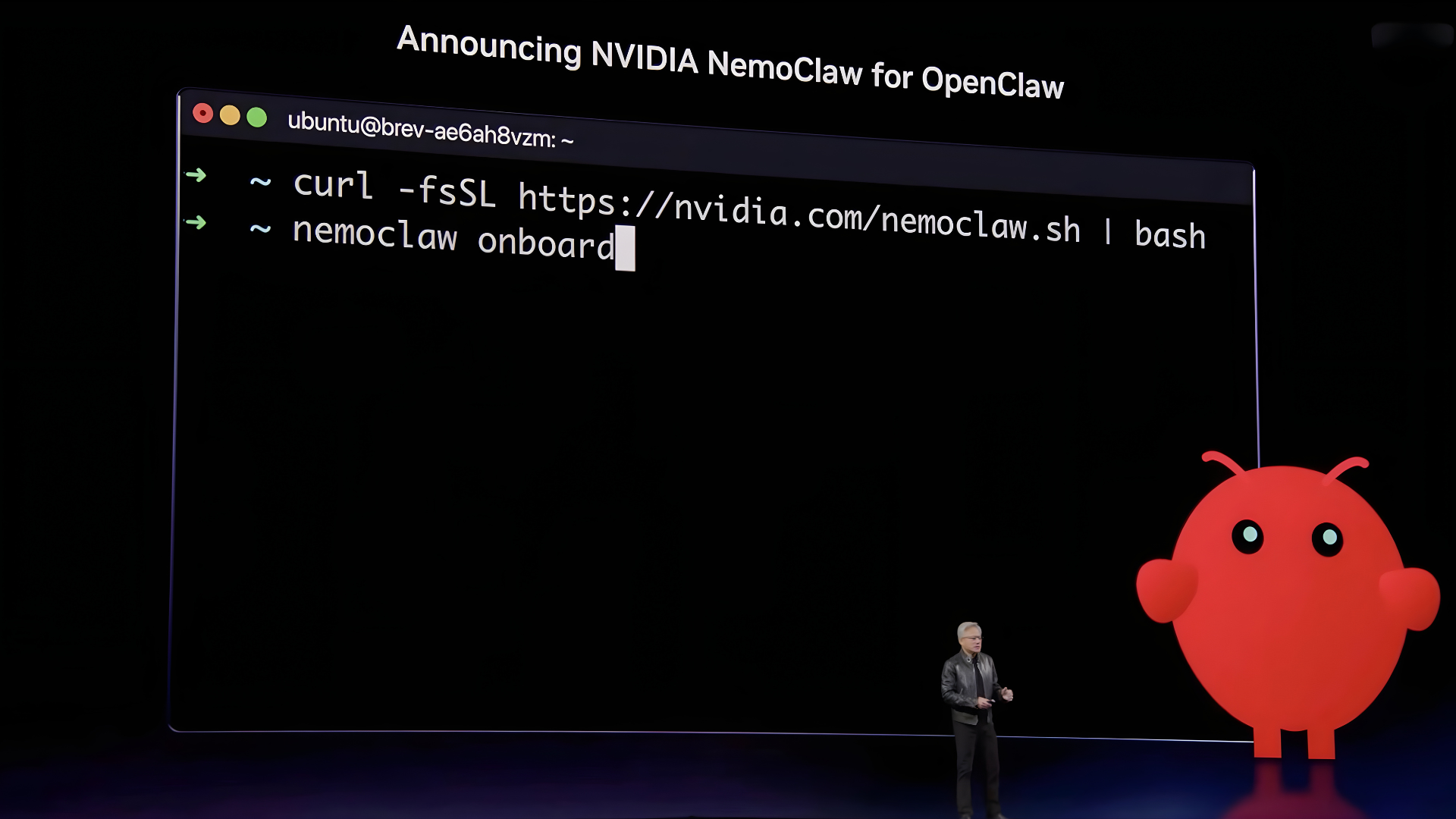
‍NVIDIA’s contribution is NeMo Claw, an enterprise-hardened reference stack that adds a policy engine, network guardrail, and privacy router on top of OpenClaw, making it safe to run inside corporate networks where agents have access to sensitive data and can execute code. The security framing here isn’t boilerplate. An agent that can read employee records, touch supply chain data, and communicate externally is a genuine security surface.

Physical AI: From Simulation to Street

‍The robotics section of the keynote was substantial. Jensen announced four new automotive partners for NVIDIA’s robotaxi-ready platform: BYD, Hyundai, Nissan, and Geely, together representing 18 million vehicles per year. Added to existing partners like Toyota, Mercedes, and GM, the installed base of NVIDIA-powered autonomous-capable vehicles is getting hard to ignore.

‍He also walked through the Cosmos-to-Isaac pipeline: Cosmos world models generate synthetic data at scale, Isaac Lab handles robot training and evaluation, and Groot provides the general-purpose robot reasoning models. The argument is that generalization (one brain for a humanoid in a kitchen, a quadruped on a road, and a robotic arm cooking) requires pooling data across every robot type, not siloing it.

‍The Disney Olaf demo at the end was genuinely impressive (the robot adapted its movement in real-time using the Newton physics solver NVIDIA co-developed with Disney Research and DeepMind), but the more important point was the underlying infrastructure: Newton, Isaac Lab, and Cosmos are all open source.

What This Means for AI Infrastructure Buyers Right Now

‍Jensen’s roadmap is annual cadence: Blackwell now, Vera Rubin next, then Feynman with a new GPU, LP40 Groq chip, and Rosa CPU. Backwards compatibility is maintained, so you’re not forced to rip and replace.

A few things worth internalizing:

Inference is your revenue line. Jensen’s token-per-watt framing isn’t just a product pitch. It’s how every CSP and enterprise AI team will evaluate infrastructure ROI going forward. The question isn’t what’s the peak FLOPS spec. It’s what’s the token yield at your power cap.

Disaggregated inference extends GPU useful life. Pairing decode-optimized Groq chips with older Hopper or Ampere clusters extracts more value from existing infrastructure. Jensen noted Ampere pricing in the cloud is going up, not down, because Cuda’s massive application reach keeps old hardware useful.

The enterprise AI stack is consolidating around agents. Every SaaS company, Jensen said, will become a GaaS company (genetics as a service). The companies that build the agent harnesses, data pipelines, and token consumption infrastructure around OpenClaw are building the next layer of enterprise software.

At Arc Compute, our view is that the infrastructure layer is settling. The GPU architecture choices are clearer than they’ve been in years. What’s less settled, and where we spend most of our time, is helping customers build the operational layer on top: inference optimization, cost per token management, and scaling agent workloads without the economics falling apart. That’s where the real work is happening right now, and GTC 2026 confirmed we’re early in it.

Arc Compute helps companies design, deploy, and optimize GPU infrastructure for production AI workloads. If you’re navigating the Blackwell-to-Rubin transition or building out inference capacity, reach out.

Data Sovereignty in AI: Why Cloud-Only Strategies Fall Short

It’s common to think of data sovereignty in AI as compliance checkboxes and audit trailsThose matter, but they’re line items on a much longer list. Near the top is a harder question: what do you do when elastic cloud isn’t enough to get AI workloads through a deepening data sovereignty quagmire? 

‍For many organizations, the answer is AI cloud repatriation: moving workloads off hyperscalers and back into sovereign, controlled infrastructure. This article explains what that means in practice, why complexity compounds as AI scales, and how to build private AI architecture that delivers both agility and compliance. You can keep the cloud, but closing the gaps isn’t optional. Regulators are watching.

AI Cloud Repatriation Is No Longer a Fringe Strategy

‍At issue is the depth to which AI data sovereignty requirements seep into an organization’s operations. Typically, the term is thought of only in terms of AI data residency. But it goes far beyond that to include at least five distinct elements:  ‍

Model training sovereignty

AI workloads have shifted from data-adjacent to data-intensive. Training and fine-tuning large AI models on proprietary enterprise data means moving sensitive information, such as customer records, intellectual property, regulated health or financial data, into environments where jurisdictional control is ambiguous at best.  ‍‍

Model inference sovereignty:

AI inference in production is no longer performed in a periodic batch process. Instead, it is continuous, latency-sensitive, and deeply integrated into business operations. The cost profile of hyperscaler inference at scale looks very different from a sandbox experiment and is typically much more expensive. ‍‍

Algorithmic sovereignty:

Model weights encode patterns, priorities, and biases during training. Those choices shape every downstream decision. If AI model training occurs on a third-party platform under opaque terms, you may lose the ability to audit what the model learned, ensure proprietary signals weren’t absorbed, or prove outputs are free of unlawful bias. Sovereignty over AI means control over what the model learned, not just where the data was stored. ‍‍

Jurisdictional sovereignty:

Data residency alone does not guarantee protection. Governments can compel cloud providers to produce data, logs, or system access regardless of where the data physically resides. The U.S. CLOUD Act, for example, allows U.S. authorities to demand data from U.S.-headquartered providers even if it’s stored abroad. True jurisdictional sovereignty requires understanding which legal systems can reach the entity that controls your infrastructure and not just where servers sit. ‍‍

AI data governance sovereignty:

Critical questions must be answered: Who can audit the system? Modify it? Shut it down? Who bears liability when it fails? In hyperscaler environments, those answers are partly shaped by provider terms, security models, and regulatory relationships. AI data sovereignty means retaining the legal authority and technical control to inspect, alter, or halt AI systems, and proving that capability before a crisis forces the question.‍‍

Think of AI data sovereignty as the control of where your data lives, what it learns, what it teaches, who can access what it knows, and who governs the system that acts on it.  

‍AI cloud strategies were never designed to handle such issues, let alone at the current speed of change. Nor were AI on-premises strategies, which offer varying degrees of increased control but also introduce capital intensity, operational complexity, and specialized GPU management burdens. 

‍As AI workloads move from limited pilots to mission-critical production systems at scale, a different logic beyond the classic AI cloud vs on-prem calculation is emerging. ‍‍‍‍

Creating Sovereign AI Infrastructure with Cloud-level Operational Agility

‍Fortunately, AI data sovereignty doesn’t require ditching the cloud platform teams expect or that contractual agreements require. The key is a hybrid AI infrastructure that can segment workloads in strategic ways to ensure your organization is in full control. But traditional hybrid AI infrastructures won’t typically fit new and evolving data sovereignty requirements.  

‍Private GPU environments purpose-built for AI deliver the best balance of cost predictability, performance, and long-term control. Strategic infrastructure partners such as Arc Compute, operating outside the hyperscaler and traditional hardware reseller models, can help design private AI environments aligned with long-term production, governance, and economic requirements.

‍No matter which industry you are in, you’ll want to look for a data classification gateway that keeps PII within sovereignty boundaries while routing anonymized data to the cloud with near-zero latency. Pair that with a unified operating model that runs all AI models and tooling on standard ML toolchains so there is no need to retrain your team on new tools. ‍‍‍‍

AI Cloud vs On-prem Trade-offs 

‍Tradeoffs between the AI cloud vs hybrid AI infrastructures should be carefully considered. But when AI data sovereignty is the key issue, as it is for every industry now, hybrid AI infrastructure holds the advantage. Here are a few reasons why:  ‍‍

Flexibility vs. control:

Hyperscaler platforms offer real advantages in elasticity and managed services. However, the trade-off is shared infrastructure, opaque pricing at scale, and governance boundaries the enterprise doesn’t set.  

Speed vs. sovereignty:

The fastest path to AI capability is usually a hyperscaler’s managed ML platform. But it is not always the most defensible one. Speed-to-deployment often creates compliance debt that is far more expensive to resolve than it would have been to design around. This is precisely what is driving AI cloud repatriation conversations at the infrastructure level across nearly every regulated industry. ‍‍

Ecosystem lock-in vs. infrastructure independence

The deeper you embed proprietary hyperscaler layers, the harder extraction becomes. The ability to renegotiate contracts, move workloads or switch providers has real value but it never shows up on the cost comparison spreadsheet until it’s too late. ‍‍

Short-term cost vs. long-term cost structure:

Hyperscaler compute looks cheap at low utilization. At production scale, the cost structure inverts and the surprise is rarely pleasant. Organizations evaluating on-prem AI clusters typically find the economics shift decisively in their favor once inference workloads reach production scale. ‍‍‍‍

What Executives Should Be Asking Now

‍The infrastructure decisions you make in the next twelve to eighteen months will be hard and expensive to reverse. AI systems accumulate dependencies fast, such as compute environments, data pipelines, and model architectures. Once they solidify, your options narrow. Before that happens, get honest answers to questions most vendor conversations are designed to avoid. Below are the questions worth asking: ‍‍

On control and custody:

  • If our primary AI infrastructure provider changed its terms of service, raised prices, or exited a market tomorrow, how long would it take us to move and what would we lose in the process? 
  • Can we produce, for a regulator or a court, a complete record of where our training data was processed, by what system, and under whose administrative access
  • Do we own our model weights outright, or does our compute agreement create ambiguity about that? 

On compliance and jurisdiction:

  • Which legal systems have the authority to compel our AI infrastructure provider to produce our data or model outputs and have we accounted for that in our risk model? 
  • When the next major regulation takes effect, does our infrastructure architecture comply by design, or will we be retrofitting controls onto a system that wasn’t built for them? 
  • If we operate across multiple jurisdictions, have we mapped which AI workloads are legally permitted to cross which borders and are we enforcing that mapping in practice? 

On economics:

  • Do we know our actual total cost of AI inference at production scale, including egress, storage, idle capacity, and support or only our headline compute rate? 
  • At what utilization level does owned or dedicated infrastructure outperform hyperscaler on-demand pricing for our workload profile, and are we above or below that threshold? 
  • Are our AI infrastructure contracts structured to give us pricing predictability as workloads scale, or are we exposed to compounding variable costs as adoption grows? 

On performance and architecture:

  • Is our current infrastructure capable of meeting the latency requirements of the AI applications we plan to put into production in the next two years instead of the ones in the sandbox today? 
  • Have we evaluated whether our hypervisor and compute layer are optimized for AI workloads specifically, or adapted from general-purpose cloud infrastructure? 

‍‍Key Takeaways

  • AI data sovereignty is not a storage problem, it’s a control problem. Where data lives is the least of it. Who controls what the model learned from it, which legal systems can compel access to it, and who governs the system acting on it are the questions that will define enterprise AI risk for the next decade. 
  • The four pressures — regulatory, geopolitical, financial, and governance — are converging, not taking turns. The EU AI Act, U.S. chip export controls, hyperscaler cost inflation, and board-level governance demands are hitting simultaneously.  
  • Cloud-only is not the same as cloud-first. Hyperscalers remain legitimate infrastructure partners for appropriate workloads. The strategic error is treating them as the default for all AI workloads regardless of sensitivity, regulatory exposure, or production scale. 
  • The AI compliance infrastructure decision made now is the competitive position held later. AI systems accumulate dependencies that are expensive to reverse.  
  • A new class of private AI infrastructure resolves what looked like an unavoidable tradeoff.Purpose-built HPC clouds with proprietary GPU hypervisors demonstrate that enterprises no longer have to choose between AI data sovereignty and performance, or between control and cost efficiency. 

Sources:  

  1. U.S. CLOUD Act — Congressional Research Service https://www.congress.gov/crs-product/R45173  
  2. Microsoft’s own legal counsel acknowledging the company “cannot guarantee data sovereignty” for EU customers before the French Senate because of US Cloud Act. 
  3. U.S. Export Controls on Advanced Semiconductors — Congressional Research Service https://www.congress.gov/crs-product/R48642  
  4. Cloud Data Sovereignty: Governance & Risk of Cross-Border Storage — ISACA https://www.isaca.org/resources/news-and-trends/industry-news/2024/cloud-data-sovereignty-governance-and-risk-implications-of-cross-border-cloud-storage  
  5. Data Privacy Trends 2026 — SecurePrivacy — Covers GDPR enforcement, India DPDPA, Brazil LGPD, U.S. DOJ bulk data rule https://secureprivacy.ai/blog/data-privacy-trends-2026  
  6. Future Forward: Following the Money in AI — KPMG https://kpmg.com/xx/en/our-insights/value-creation/future-forward.html  
  7. EU Digital Omnibus: GDPR, AI Act & Data Act Changes — White & Case https://www.whitecase.com/insight-alert/eu-digital-omnibus-what-changes-lie-ahead-data-act-gdpr-and-ai-act  

A CEO’s Guide to AI Inference Economics

Why enterprise AI infrastructure investments often fail to deliver ROI, and how to fix it

‍You approved the AI budget. 
The servers were ordered. 
The infrastructure went live. 

Months later the project is behind schedule, costs are higher than expected, and the promised ROI has not appeared. If this sounds familiar, you are not alone. 

‍According to the Forbes Research 2025 AI Survey, fewer than 1% of C-suite respondents report significant ROI from AI initiatives. At the same time Deloitte projects that roughly two-thirds of AI compute in 2026 will be inference, meaning the ongoing process of running AI models in production. 

‍The economic challenge of AI is no longer training models. It is operating them efficiently. 

‍Understanding AI inference economics, which is the cost structure and operational efficiency of running AI workloads, is becoming essential for executives investing in AI infrastructure. 

Why Enterprise AI Initiatives Struggle Economically

Many enterprise AI projects fail to deliver expected value for a simple reason. Leaders underestimate what it actually takes to run AI infrastructure. Buying GPU servers is not the difficult part. In many ways it is similar to buying traditional servers, although significantly more expensive. The complexity begins after the hardware arrives. Two common issues derail AI economics before meaningful results ever appear. 

1. Operational Complexity Nobody Budgeted For

‍AI deployments require far more than compute power. 

‍To operate effectively an enterprise AI environment needs: 

  • cluster management systems 
  • cloud service portals 
  • integration with internal workflows and data systems 
  • monitoring and orchestration layers 
  • teams capable of maintaining the entire stack 

‍This operational layer is where many organizations run into trouble. 

‍Projects that looked straightforward on paper suddenly require specialized expertise. Internal teams spend months building infrastructure that was never part of the original plan. External consultants are brought in to fix problems mid-deployment. 

The result is predictable. Timelines slip, costs rise, and the anticipated ROI disappears. Buying GPUs is easy. Making them work the way the organization actually needs is far more difficult. 

‍Enterprise AI environments must serve multiple types of users at once. Data scientists often require direct access to infrastructure. Analysts need tools that allow them to interact with models through applications. Business leaders want usable AI systems that deliver answers and insights without dealing with the underlying infrastructure. 

‍Designing an environment that supports all of these needs simultaneously requires thoughtful architecture and operational planning. 

2. Poor Data Readiness

Another obstacle appears once the infrastructure is running.

‍Many organizations discover they do not actually have the data foundation required for AI to deliver value. Imagine a logistics company that wants to reduce fuel costs using AI-optimized route planning. Leadership approves the project, infrastructure is deployed, and the system is ready to run. 

‍Then the team realizes the data required to power the model has never been properly captured or structured. Information about routes, delivery patterns, vehicle utilization, and historical performance exists in scattered systems or is not recorded consistently. The infrastructure is operational. The insights are not. 

‍AI does not generate value from ambition alone. It requires clean, structured, and accessible data. For many organizations, achieving that readiness is a larger effort than deploying the infrastructure itself. 

The Hidden Costs of AI Infrastructure

Even when AI deployments succeed technically, their economics can still break down. AI inference is not a one-time event. It is a continuous operational cost. Every prompt, query, or model output requires compute resources. Several cost drivers frequently surprise executives. 

Operational overhead

Running GPU infrastructure requires constant management. Hardware components eventually fail. Data center environments require maintenance.

‍Cluster management systems must orchestrate workloads and maintain performance. Without automation and operational expertise these tasks create a growing burden for internal teams. 

GPU underutilization

One of the most overlooked economic problems is utilization. Industry research indicates that most organizations operate GPU infrastructure well below full capacity. Many environments run at less than 70% utilization even during peak demand. 

‍This means a large portion of extremely expensive hardware sits idle for significant periods of time. With proper infrastructure design unused capacity can often be allocated to additional workloads or listed on compute marketplaces. Improving utilization alone can significantly change the economics of AI infrastructure ownership. 

Scaling surprises

AI initiatives frequently begin with small pilot projects. A single tool may initially serve a small team. When it proves valuable the organization expands access across departments or deploys additional AI applications. 

‍Infrastructure that was not designed to scale can require costly redesign once adoption grows. Planning for expansion from the beginning is far less expensive than rebuilding systems after they become successful. 

Four Decisions Every CEO Should Make Before Investing in AI Infrastructure

Organizations that extract real value from AI tend to approach infrastructure decisions deliberately. Executives evaluating AI infrastructure should consider four key questions. 

1. Choose a consumption model

Organizations must decide whether they will own infrastructure or consume compute as a service. Owning infrastructure through a capital investment provides long-term efficiency and control. Consuming compute as an operational expense offers flexibility and faster deployment. 

Neither model is universally correct. The right decision depends on workload growth, financial strategy, and operational capabilities. 

2. Determine who will manage the infrastructure

AI infrastructure requires specialized operational expertise. Organizations must decide whether internal teams will manage the environment, whether a partner will operate it, or whether management responsibilities will transition over time. 

Infrastructure that no one is qualified to operate will ultimately cost more than infrastructure that is slightly oversized. 

3. Define guiding principles

Some infrastructure decisions are driven by organizational priorities rather than pure economics. Examples include data sovereignty requirements, regulatory considerations, and policies around where sensitive information can be processed. 

These principles shape infrastructure strategy and should be defined before major investment decisions are made. 

4. Start with high-ROI workloads

A common mistake is building infrastructure before identifying the use cases that will generate value. Successful deployments typically begin with two or three targeted workloads that deliver measurable benefits. 

Examples include internal knowledge assistants powered by retrieval-augmented generation, AI copilots for analysts or support teams, and operational optimization tools for logistics or supply chain management. Starting with focused applications allows organizations to generate quick wins and build momentum for broader adoption. 

Where the Real Enterprise Value in AI Lives

Public conversations about AI often focus on model capabilities and size. For most enterprises the real economic value lies elsewhere. It lies in how AI workloads are designed and executed

Well-structured inference workloads create value in several ways. 

Efficient infrastructure allows organizations to run more workloads on the same hardware, reducing capital requirements. 

Clear and targeted inference requests produce better outputs from AI systems. Multiple smaller tasks often deliver better results than a single complex request. Improved utilization ensures expensive infrastructure is not sitting idle. 

When organizations focus on inference optimization instead of only model selection, they unlock much stronger economic outcomes. 

The Bottom Line

Enterprise AI economics are not primarily a hardware problem. They are a strategy and execution problem. 

Organizations that extract meaningful value from AI infrastructure make deliberate decisions about architecture, operations, and workloads from the beginning. They design systems that scale cleanly, integrate into existing workflows, and operate efficiently as adoption grows. 

The hardware may be the most visible component of AI infrastructure. It is rarely the most difficult part. Everything around it, including cluster management, operational tooling, data readiness, and workload orchestration, determines whether AI investments succeed or fail. 

How Arc Compute Helps Enterprises Realize AI ROI

Arc Compute focuses on the layers of AI infrastructure that most organizations underestimate. 

While many vendors concentrate on hardware procurement, the real challenge for enterprises is building an environment where GPU infrastructure can actually be used efficiently across the organization. 

Arc designs and deploys turnkey AI infrastructure environments that integrate the hardware, software, and operational layers required for enterprise AI. 

This includes the cluster management systems, cloud service portals, and integration frameworks that allow infrastructure to support different types of users at once. Data scientists may require direct compute access. Analysts may interact with models through applications. Business teams often need AI tools embedded into existing workflows. A well-designed environment must support all of these use cases simultaneously. 

Arc also works with organizations to ensure infrastructure is built with long-term scalability and economic efficiency in mind. This includes designing clusters that can grow without costly architectural rebuilds, implementing orchestration layers that maximize GPU utilization, and enabling organizations to run multiple AI workloads on the same infrastructure. 

In many cases Arc helps enterprises transform GPU infrastructure from a difficult operational project into a usable internal platform that supports real business outcomes. 

For organizations investing in AI infrastructure, the difference between success and disappointment often comes down to how well these operational layers are designed from the beginning. Arc’s role is to ensure those layers work the way enterprises actually need them to.

Liquid Cooling for GPU Infrastructure: How Air Cooling Limits AI Scaling

Not long ago, CTOs, CIOs, and VP-level leaders were debating whether to adopt liquid cooling for GPU infrastructures supporting high-density AI workloads and training clusters. Today, it’s not a question of if, but when.

A single NVIDIA B200 or B300 server consumes more than 10 kilowatts of power per system. Many legacy data centers were built when 3 to 5 kilowatts per rack was standard. Now, they cannot host even one of these systems.

Next-generation platforms like NVIDIA’s Rubin are expected to push rack densities toward 500 kilowatts per rack. At that scale, air cooling becomes not just inefficient, but physically incompatible with modern AI infrastructure requirements.

Let’s break down why liquid-cooled AI infrastructure is becoming a structural requirement for modern GPU environments. We’ll also discuss the operational and financial considerations leaders need to evaluate when planning the transition.

Why Air Cooling Cannot Keep Up With Growing GPU Workloads

GPU systems designed for large-scale AI processing run at sustained high power levels, generating heat at a scale that traditional air-cooled data center infrastructure was never engineered to handle.

Consider the progression: legacy data centers were designed for racks drawing roughly 3 to 10 kilowatts of power.

Today’s GPU servers, including platforms like the NVIDIA B200 and B300, draw upwards of 10 kilowatts per server. An NVIDIA GB200 NVL72 rack operates at roughly 120 kilowatts.

The Rubin generation will push beyond 500 kilowatts per rack. As GPU hardware continues to evolve, power density and heat output increase, and air cooling becomes less capable of removing the resulting thermal load.

When servers begin operating at upwards of 10 kilowatts per system, air simply is not efficient enough. The amount of heat that can be removed from a server with air is drastically lower than what can be achieved with liquid cooling.

The physics explain why. Water transports heat far more effectively than air. By volume, it can carry roughly 3,000 times more heat for a similar temperature rise, allowing liquid coolant to remove thermal energy with much higher efficiency.

Most enterprise data centers today cannot support more than two air-cooled GPU servers per rack due to a combination of thermal limits and the sheer physical size of air-cooled designs, which typically run 8U to 10U tall per server. The result is a practical ceiling on what air-cooled AI infrastructure can deliver.

This is not a theoretical future concern, but a constraint that organizations are running into today with hardware that is already shipping.

The Benefits of Liquid Cooling for GPU Infrastructure

The case for GPU liquid cooling is built on five compounding advantages. Together, they reframe liquid cooling not as a premium option but as the more rational infrastructure decision for any serious AI deployment.

1. Dramatic Increase in GPU Rack Density

Liquid-cooled GPU servers are physically smaller (typically 4U compared to 8U to 10U for equivalent air-cooled designs) and thermally dense enough to fully fill a rack.

Where an air-cooled facility might support one to two GPU servers per rack due to thermal and physical constraints, a liquid-cooled environment can support four to eight, and sometimes more, depending on rack power capacity.

In real-world cluster terms: a 144-node GPU cluster that requires 72 air-cooled racks can be deployed in just 18 liquid-cooled racks. That is the same compute capacity in one-quarter of the physical footprint.

At a time when U.S. data center capacity is running at approximately 97 percent utilization, density is not a nice-to-have. It is a strategic asset.

4× reduction in rack count for equivalent compute

2. Lower Cabling Costs and Fewer Network Failures

Rack density has a downstream effect that is easy to overlook in the early planning stages. It determines your cabling architecture, and your cabling architecture determines your cluster reliability.

When a 144-node cluster is spread across 72 racks, inter-rack cable runs extend far beyond the practical limit of five to seven feet for direct-attach copper (DAC) and active optical copper (AOC) cables. At that scale, the network must use fiber and optics.

Optics are expensive. They also fail at a meaningfully higher rate than copper alternatives. Those failures do not just trigger a support ticket. They interrupt active training runs, waste compute hours, and add operational overhead.

Consolidating that same cluster into 18 liquid-cooled racks brings nearly all inter-GPU connections within DAC/AOC range.

This one architectural shift eliminates a category of hardware failure and significantly reduces cabling spend, a benefit that persists and compounds over the cluster’s operational lifetime.

3. Greater Thermal Stability and Hardware Reliability

Liquid cooling maintains more consistent component temperatures than air, particularly during the sustained high-utilization workloads that define AI training.

Stable temperatures mean fewer thermal stress cycles, which translates directly to lower hardware failure rates and longer GPU lifespans.

For organizations running continuous training jobs, the math on reliability is unforgiving. An unplanned hardware failure does not just pause a job. It can invalidate hours or days of compute progress, require checkpoint recovery, and delay project timelines.

Liquid cooling reduces that risk category in a way that better air conditioning simply cannot replicate.

4. Superior Energy Efficiency

Liquid-cooled data centers consistently achieve Power Usage Effectiveness (PUE) ratings below 1.2. Air-cooled facilities typically range from 1.4 to 1.6.

That gap, though seemingly small in percentage terms, represents a substantial difference in operating cost at the scale of a modern, continuously running GPU cluster.

More efficient cooling also means more of the power drawn by a facility is going to actual compute rather than thermal management infrastructure.

For AI labs and cloud providers optimizing for cost per GPU-hour, this increase in efficiency directly affects the economics of every workload.

5. Scalability Without the Floor Space Constraint

Air-cooled GPU clusters face two scaling limits: thermal capacity and physical space.

As clusters grow, so does the floor space required to support additional racks. In a market where enterprise data center capacity is near saturation, floor space is scarce and expensive.

Liquid cooling’s density advantage reduces the physical space required for GPU clusters. Organizations can expand compute capacity within the same physical footprint, without competing for new colocation space or financing additional facilities.

That flexibility has measurable strategic value as AI workloads grow and cluster scale requirements increase.

The Tradeoffs: What Leaders Need to Plan Before Adopting Liquid Cooling

Liquid cooling is not a plug-and-play upgrade, and infrastructure leaders who approach it as one will run into planning failures. The tradeoffs just require strategic evaluation.

Installation requires specialist expertise. Water in a data center is not a DIY project. Routing coolant lines, managing pressure systems, implementing leak detection, and validating the full installation requires professional infrastructure teams. This is a baseline requirement, not an optional service tier.

An average build takes months to complete. Converting an existing facility to support liquid cooling typically takes six to eight months at a minimum. Building a purpose-built liquid-cooled data center from the ground up takes two years.

Even converting an industrial warehouse to a liquid-cooled data center can take six months at minimum using modular infrastructure, assuming the required power is available at the selected site.

That means organizations evaluating liquid cooling in response to an immediate capacity need are likely already behind schedule.

Upfront capital is higher, but total cost often is not. Building liquid-cooled infrastructure costs more than equivalent air-cooled construction.

However, the total cost of ownership calculation changes significantly at the cluster level. Liquid-cooled colocation charges more per rack, but the reduction in rack count means total facility spend is often comparable or lower than an air-cooled equivalent for the same compute.

The right unit of analysis is cost per GPU versus cost per rack.

These are planning considerations that require early evaluation. The organizations running liquid-cooled AI infrastructure competitively today started those facility conversations twelve to eighteen months ago.

How NVIDIA’s GPU Roadmap Is Driving the Shift to Liquid Cooling

NVIDIA’s hardware roadmap has effectively made the industry’s decision: liquid cooling is moving from an option to a requirement.

Rubin, NVIDIA’s next-generation GPU platform, is architected for liquid cooling. Running Rubin-class hardware in an air-cooled environment is not a thermal management challenge, but an impossibility.

The same trajectory is visible at the network layer. The engineering limit for switch ports is roughly 20 watts per port, and optics operating above that threshold tend to fail rapidly in air-cooled environments.

NVIDIA has already launched a closed-loop liquid-cooled switch to address this. Other vendors are expected to follow.

The market data confirms the trajectory. The global liquid cooling market was valued at approximately $4.7 billion in 2025 and is projected to reach $21 billion by 2032, a compound annual growth rate exceeding 30 percent.

Every major hyperscaler has committed liquid cooling as the default for new AI infrastructure. Microsoft, Google, AWS, Meta, and CoreWeave are all building or converting at scale.

For enterprise AI labs, cloud infrastructure teams, and VP-level decision-makers, the practical implication is clear: organizations that plan their infrastructure around liquid cooling now will have compatibility with next-generation GPU platforms. Those that do not will face a forced transition on a compressed timeline with fewer options.

The Bottom Line

There are significant GPU liquid cooling benefits: four to eight times higher rack density, lower cabling costs and failure rates, improved hardware reliability, better energy efficiency, and forward compatibility with next-generation GPU platforms that air cooling cannot support at all.

The tradeoffs include longer build timelines, higher upfront capital, and the need for specialist installation.

But organizations that take liquid cooling seriously now are building the infrastructure foundation for the AI compute they will need in 2026, 2027, and beyond. Those that treat it as a future concern may find that the future arrives before the facility is ready.

The physics, the GPU roadmap, and the market have converged on the same answer. Liquid-cooled AI infrastructure is no longer optional for facilities planning the next generation of AI compute.

Planning the Transition to Liquid-Cooled AI Infrastructure

As organizations rethink how to deploy and scale GPU infrastructure, the transition to liquid-cooled environments requires both hardware expertise and infrastructure strategy. At Arc Compute, we work with AI labs, cloud providers, and enterprise infrastructure teams to design GPU environments that are ready for next-generation platforms, from today’s high-density clusters to the architectures coming next. That means helping teams evaluate power density, cooling architecture, and system design so their infrastructure decisions today remain compatible with the compute demands of tomorrow.

GPU Infrastructure for Medical Imaging AI: A 2026 Guide for Radiology and Pathology

It’s incredible to think about the fact that just 11 years ago, the FDA only authorized 6 AI and machine learning (ML) medical devices. However, when you jump forward to 2023, that number jumped to 221 within that single year. More recently (as of late 2025), the cumulative total stands at over 1,300 authorized AI-enabled imaging devices, with radiology accounting for nearly 80 percent of all approvals.‍

Looking back on these numbers, you can quickly see how the shift to AI is not a simple trend, but a more monumental move in how diagnostic medicine works.  

‍In fact, the global AI in medical imaging market reached $2.01 billion in 2025 and is expected to grow more than tenfold to $22.97 billion by 2035(growing at a CAGR of 27.57%)

‍When you analyze where this investment has gone, you see that on-premises deployment models dominate. In 2025, they accounted for 58 percent of the market, reflecting the compliance and latency realities that push healthcare organizations toward controlled infrastructure over public cloud. 

The demand is clear – but when it comes to what holds AI initiatives back? It’s not algorithm quality, but the GPU infrastructure underneath them – a subject we’ll explore in depth. 

‍This guide covers what optimal on-premises GPU infrastructure for medical imaging AI looks like in 2026:  

  • real hardware requirements,  
  • HIPAA architecture,  
  • the radiology-vs-pathology infrastructure divide,  
  • and why NVIDIA Blackwell matters for clinical workloads specifically.

‍Let’s dive in.

Why Medical Imaging AI Is Harder on Infrastructure Than Most Teams Expect 

Medical imaging AI workloads are unlike standard enterprise AI.  

The data volumes, latency requirements, and compliance constraints all demand infrastructure that’s designed specifically for healthcare.

As an example, a whole slide image (WSI) in digital pathology scanned at 40x magnification sits at around 100,000 x 100,000 pixels, which is roughly 2GB compressed and up to 30GB uncompressed.  Here’s what that amounts to when you scale that to a production pathology department: 

Deployment Scale Slides/Day Estimated Annual Storage
Mid-size lab (3–5 scanners) ~500 ~180 TB
Large facility (9+ scanners) ~1,800 ~1.1 PB
Academic medical center (multi-site) 3,000+ 2+ PB

In radiology, data volumes are more manageable, but latency requirements are dramatically tighter.  

For example, an AI triage tool for acute stroke or pulmonary embolism must return results within the clinical window of relevance, often within seconds of scan acquisition.  

You can see how this then becomes a real-time inference problem requiring dedicated, low-jitter GPU access that public cloud configurations cannot reliably deliver. 

Radiology AI vs. Pathology AI: Two Fundamentally Different Infrastructure Problems 

Quick answer: Radiology AI is an inference latency problem. Pathology AI is a GPU memory and storage problem. Treating them on the same infrastructure model is one of the most common and expensive mistakes in healthcare AI deployment.

When considering any solution, it always helps to be laser focused on the exact problem that you’re attempting to solve. 

In healthcare, the issues can shift depending on the department. For instance, by the very nature of the work undertaken in radiology, which requires speed and precision, latency can become an enormous issue.

In contrast, the high GPU memory and storage demands of pathology are clear, given the complexity of the imaging that’s produced.  

Here’s a head-to-head infrastructure comparison that makes the challenges within each department clear: 

Dimension Radiology AI Digital Pathology AI
Primary bottleneck Inference latency GPU memory + storage I/O
Data format DICOM (CT, MRI, X-ray, PET/CT) Proprietary WSI (SVS, NDPI, MRXS)
Typical file size 50 MB to 1 GB per study 2 GB compressed / 30 GB uncompressed per slide
Clinical SLA Seconds (real-time workflow) Minutes to hours (batch pipeline)
Key GPU metric Memory bandwidth, queue throughput Total VRAM, multi-GPU scaling
Primary framework NVIDIA MONAI + Clara, Triton Inference MONAI + RAPIDS cuCIM, GPUDirect Storage
Deployment pattern Dedicated inference nodes, PACS-adjacent Compute co-located with petabyte NVMe storage

Radiology: Overcoming the Latency Problem 

As mentioned above, one of the central issues within radiology is that latency requirements are dramatically tighter.

One of the ways that healthcare organizations are managing these requirements is with NVIDIA's MONAI framework, which is deployed across Siemens Healthineers' Syngo Carbon and syngo.via platforms. 

To quantify how prevalent MONAI is, you can consider that it now covers over 15,000 clinical devices globally. Plus, institutions including Mayo Clinic and UCSF have used MONAI Deploy to run AI models for hip fracture detection, liver tumor segmentation, and foreign body detection directly inside clinical radiology workflows. 

AI Use Case Required Response Time Consequence of Latency Failure
Acute stroke triage (CT) Under 5 minutes from scan to alert Delayed treatment; increased disability risk
Pulmonary embolism detection Under 10 minutes Missed critical intervention window
Chest X-ray preliminary read Under 2 minutes Workflow bottleneck in high-volume ED settings
ICU continuous monitoring AI Real-time (sub-second) Alert fatigue or missed deterioration events


Here’s a deeper look into what on-premises radiology AI GPU infrastructure requires: 

  • Dedicated inference servers separate from general hospital compute 
  • NVMe flash storage co-located with inference nodes to eliminate DICOM retrieval latency 
  • High-bandwidth PACS connectivity (the system that stores and routes all imaging data) 
  • Low queue jitter for consistent, predictable response time across concurrent AI models 

Pathology: The Memory and I/O Problem 

Because whole slide images cannot fit into GPU memory at full resolution, pathology AI pipelines use patch-based processing: breaking each gigapixel slide into thousands of tiles, generating embeddings per tile, then aggregating results. For a 40x magnification nuclear segmentation task, a single slide can yield up to 709,000 nuclear centroidsthat must each be stored, transferred, and processed. 

Here’s an overview of what the I/O math looks like in practice: 

Transfer scenario Time required
1,000 slides x 3 GB at 100 Mbps 66+ hours
1,000 slides x 3 GB at 10 Gbps ~40 minutes
1,000 slides x 3 GB with GPUDirect Storage Up to 11.8x faster than standard transfer


What digital pathology AI GPU infrastructure requires: 

  • Multi-GPU nodes with 80GB+ VRAM  as a minimum viable starting point for production WSI inference 
  • GPUDirect Storage  for Direct Memory Access (DMA) transfers between NVMe and GPU memory, bypassing CPU overhead 
  • NVMe-backed parallel file systems co-located with compute
  • 400GbE/800GbE interconnects between storage and compute to eliminate network as the bottleneck 

The HIPAA Problem That Catches Most Infrastructure Teams Off Guard 

Quick answer: Once PHI enters a GPU workload, HIPAA compliance obligations extend to the hardware layer. Shared multi-tenant cloud GPU environments are fundamentally difficult to reconcile with HIPAA’s Security Rule requirements. On-premises or dedicated colocation infrastructure is the defensible architecture for PHI-adjacent AI inference in 2026.

HIPAA compliance obligations for AI workloads extend all the way to the GPU, creating an architectural problem. 

The core tension is that traditional compliance frameworks were built for static systems, while GPU workloads are dynamic and high-throughput. Data moves across nodes, memory containers, and interconnects in milliseconds, making consistent access control, immutable logging, and strict tenancy isolation difficult to guarantee in standard multi-tenant cloud environments. 

In January 2025, HHS OCR proposed the first major overhaul of the HIPAA Security Rule in 20 years, explicitly addressing dynamic AI compute environments and removing the distinctions that previously allowed more flexibility in how organizations managed electronic protected health information (PHI) in high-throughput workloads. 

HIPAA-Aligned GPU Infrastructure: What Every Layer Requires 

Infrastructure Layer Compliance Requirement
Compute Dedicated, single-tenant nodes with no shared tenancy
Data residency PHI confined to verifiable jurisdictions with physical access controls
Encryption AES-256+ at rest; TLS in transit; GPU memory encryption where available
Access control Role-based access with MFA on all administrative and inference interfaces
Audit logging Tamper-resistant, continuous logs covering all PHI interactions
Confidential computing Hardware attestation for highest-risk PHI workloads
Vendor agreements Signed Business Associate Agreements (BAAs) covering every infrastructure layer

The Clean Hybrid Architecture 

Workload type Recommended deployment
PHI-adjacent inference (live patient data) Hospital-controlled or dedicated co-location, physically isolated
Anonymized training and R&D Cloud burst capacity with BAAs and validated de-identification
Orchestration and monitoring control plane Managed centrally, but never touches raw PHI

The key principle: You must be able to demonstrate data residency to an auditor, instead of  simply asserting it contractually. 

Why NVIDIA Blackwell Changes the Equation for Medical AI in 2026 

Quick answer: NVIDIA Blackwell B300 is the right GPU generation for new healthcare AI deployments in 2026. The 192GB HBM3e memory in B200 configurations directly removes the GPU memory ceiling that has constrained digital pathology AI on H100 hardware.

The HGX B200, now in volume production as of early 2026, represents a major leap in performance, memory bandwidth, model size handling and real-time AI deployment.  

It delivers 192GB HBM3e memory per GPU at 8 TB/s memory bandwidth: a 2.4x memory increase over the H100. A full DGX B200 system (8 GPUs via fifth-generation NVLink at 1.8 TB/s) delivers 3x faster training and 15x faster inference versus DGX H100. 

The following table compares it (Blackwell) to its predecessors, H100 and H200 (Hopper).

GPU Generation Comparison for Medical AI 

GPU Memory Key Advantage for Medical AI
H100 (Hopper) 80GB HBM3e Strong radiology inference; limits WSI batch sizes in pathology
H200 (Hopper+) 141GB HBM3e Improved pathology performance; supersedes H100 for new installs
B200 (Blackwell) 192GB HBM3e Larger WSI patches without accuracy-degrading tiling; fits multimodal foundation models
B300 (Blackwell Ultra) 288GB HBM3e Planetary-scale models; 50% more FP4 throughput

For pathology AI specifically, larger GPU memory means larger image patches can be processed without the tiling workarounds that sacrifice spatial context and model accuracy. For foundation models like Microsoft's Prov-GigaPath, pretrained on over 1.3 billion pathology image tiles, the memory capacity of Blackwell enables inference configurations that were not practical on H100 hardware. 

Upgrade Decision Framework 

Note: Some of these platforms are no longer available but they are mentioned here for illustrative purposes, should an organization already have them deployed. 

Primary workload Recommendation
Single-modality radiology inference at moderate volume H200 for now; plan Blackwell transition within 12–18 months
Multi-modality concurrent radiology AI (CT + MRI + X-ray) B200 now
Digital pathology WSI inference at production scale B200 or B300 (memory is the binding constraint)
Multimodal foundation model training on institutional data B200/B300 from the start
Federated learning across multi-site hospital networks Blackwell + NVIDIA FLARE


You can read this blog to understand recent GPU availability.

What Production Healthcare GPU Infrastructure Looks Like in 2026 

Quick answer: Healthcare GPU infrastructure for medical imaging requires five distinct layers: compute, storage, networking, orchestration, and compliance. Getting any one wrong creates a bottleneck or a liability.

There are five distinct layers to healthcare GPU infrastructure for medical imaging, and each needs due consideration so that you can avoid creating a bottleneck - or worse, a liability.  

1. Compute 

  • Multi-GPU nodes dedicated to imaging AI, not shared with general hospital compute 
  • Physical isolation from non-PHI infrastructure 
  • GPU-aware Kubernetes scheduling with per-application resource quotas 

2. Storage 

  • NVMe-backed parallel file systems co-located with GPU nodes 
  • DICOM-aware storage management for radiology archives 
  • WSI format support (SVS, NDPI, MRXS) with vendor-agnostic access APIs for pathology 
  • Petabyte-scale capacity planned from day one 

3. Networking 

  • 400GbE or 800GbE between compute and storage for pathology pipelines 
  • Dedicated low-latency switching for radiology inference clusters 
  • Isolated VLANs or physical network segmentation for PHI workloads 

4. Orchestration and Software 

  • NVIDIA MONAI Deploy for clinical AI application packaging 
  • Triton Inference Server for concurrent multi-model serving in radiology 
  • NVIDIA FLARE for federated learning across sites where data must remain local 

5. Compliance and Security 

  • Hardware attestation and confidential computing for PHI workloads 
  • Immutable audit logs covering all PHI interactions 
  • Role based access control (RBAC), which restricts access based on role level instead of  individual identity, needs to be integrated with hospital identity management (LDAP/Active Directory) 
  • Signed BAAs covering every infrastructure layer 

The Real Risk: Infrastructure That Needs Re-Architecture at Scale 

The infrastructure supporting medical imaging AI needs to be planned with the same rigor you would apply to any other clinical system. 

Healthcare organizations that get GPU infrastructure right from the start are the ones who apply this rigor. The result is a system that’s designed for compliance, built for the workload, and planned at the scale that you will be operating at in three years time (not the scale you are at today). 

The teams that get it wrong tend to follow a predictable pattern. They start on shared cloud GPU instances, hit HIPAA questions 12 months in and discover storage latency is throttling their pathology pipeline, as their radiology inference queue competes with other hospital compute workloads. The next 18 months (and a significant amount of budget) is then spent rebuilding what should have been architected correctly the first time. 

Ready to Build Infrastructure That Won't Hold You Back? 

Arc Compute works with hospitals, healthtech startups, and research institutions to design, deploy, and support NVIDIA GPU clusters built specifically for clinical AI workloads: from HIPAA-aligned architecture and on-premises data sovereignty, to Blackwell hardware procurement and long-term performance optimization for medical imaging teams. 

Talk to our team at arccompute.io

Frequently Asked Questions 

1. What GPU memory is required for digital pathology AI?

A minimum of 80GB GPU VRAM per GPU is required for production whole slide image (WSI) inference at 40x magnification. For concurrent multi-slide pipelines or training workloads, multi-GPU nodes with NVIDIA H200 (141GB) or Blackwell B200 (192GB) configurations are recommended. 

2. Is public cloud GPU infrastructure HIPAA compliant for medical AI?

Public cloud GPU instances can be made HIPAA compliant with appropriate BAAs and configuration controls, but multi-tenant environments introduce audit trail complexity that dedicated on-premises or colocation GPU clusters avoid by design. For PHI-adjacent inference workloads, on-premises infrastructure is the more defensible architecture. 

3. What is the difference between radiology AI and pathology AI infrastructure requirements?

Radiology AI is primarily a latency-sensitive inference workload requiring fast PACS connectivity and low-jitter GPU response times. Digital pathology AI is dominated by GPU memory pressure and storage-to-compute throughput, requiring high-memory GPU nodes and NVMe storage co-located with compute. They should be treated as separate infrastructure planning problems. 

4. Should hospitals use NVIDIA Blackwell or Hopper GPUs for medical imaging AI in 2026?

For new deployments, Blackwell (B200 or B300) is the right generation for pathology AI and multimodal foundation model workloads. H200 remains strong for single-modality radiology inference at moderate scale. H100 configurations are still viable for existing deployments but should not be the basis for new capital planning. 

5. What is NVIDIA MONAI and why does it matter for hospital AI infrastructure?

MONAI (Medical Open Network for AI) is NVIDIA's open-source framework for medical imaging AI, now deployed across over 15,000 clinical devices globally via Siemens Healthineers. MONAI Deploy enables AI models to be packaged as containerized clinical applications that run on on-premises GPU infrastructure integrated directly into clinical workflows. 

6. What networking speed is needed for digital pathology AI pipelines?

A minimum of 10 Gbps between storage and compute is required for practical pathology AI throughput. Production-scale deployments benefit from 400GbE or InfiniBand interconnects. GPUDirect Storage enables direct DMA transfers from NVMe to GPU memory and can deliver up to 11.8x acceleration for parallel slide processing. 

‍‍‍‍Sources 

  • FDA AI-Enabled Medical Device List (2025): U.S. Food and Drug Administration 
  • The Imaging Wire, AI Medical Device Authorization Counts (December 2025) 
  • Precedence Research, AI in Medical Imaging Market Report (December 2025) 
  • Andrew Janowczyk, Case Western Reserve University: Whole Slide Image Resolution and File Size Reference 
  • MDPI Digital Pathology Review (2024): WSI data specifications 
  • Peer-reviewed digital pathology infrastructure literature: Storage scale estimates 
  • NVIDIA Technical Blog: MONAI + RAPIDS for Digital Pathology: 709,000 nuclear centroids per slide; GPUDirect Storage 11.8x acceleration figure 
  • NVIDIA cuCIM Documentation: GPUDirect Storage parallel read performance 
  • NVIDIA Blog, RSNA 2024: MONAI deployment across 15,000+ Siemens Healthineers clinical devices 
  • NVIDIA DGX B200 Datasheet (2025): B200 memory specs, NVLink bandwidth, training and inference performance vs. H100 
  • NVIDIA Blackwell Architecture Datasheet (2025): GPU memory and bandwidth specifications 
  • Exxact Corporation GPU Comparison Guide (2025-2026): H100, H200, B200, B300 comparison 
  • Nature (2024): Microsoft Prov-GigaPath, pretraining on 1.3 billion pathology image tiles 
  • HIPAA Vault (2025): GPU infrastructure compliance requirements under HIPAA 
  • WhiteFiber Technical Documentation: GPU Infrastructure Compliance in Regulated Healthcare AI 
  • HIPAA Journal (January 2025): HHS OCR proposed HIPAA Security Rule overhaul 
  • HHS Office for Civil Rights (OCR): HIPAA Security Rule (45 CFR Part 164)

Why AI Servers Are Getting More Expensive

AI server costs are rising at a pace that is breaking procurement plans, budget models, and deployment timelines across the industry.

Every layer of the stack, including GPU modules, memory, networking, power, and cooling, has repriced sharply heading into 2026. This is not a temporary spike or a factory shutdown. The cost escalation is structural, driven by four compounding forces.

This article breaks down each one, what buyers consistently underestimate, and the practical steps infrastructure leaders can take to plan and procure effectively in this environment.

“Buying the GPU server is the stressful and expensive, but frankly, easy part of building AI infrastructure.” 

– Josh Gelata, Infrastructure Lead, Arc Compute

The Market Shift That Changed Everything

Before ChatGPT launched in late 2022, GPU procurement was a specialist concern.

Supply and demand were reasonably balanced. OEM quotes were valid 30-90 days. Payment terms were net 30 or net 60. What followed was not a gradual ramp. It was a step-change in demand across every sector simultaneously. Intermediaries entered and began speculating on hardware.  

Hyperscalers competed for allocations at unprecedented scale. The procurement dynamics that had underpinned enterprise infrastructure buying for decades became obsolete almost overnight.

The symptoms are visible:  

  • OEM and distributor quote validity windows that used to be 30–90 days are now commonly 7–14 days across major server vendors.  
  • Payment terms have moved to 50% or 100% upfront for GPU hardware.  
  • Allocations disappear within 48 hours of being offered. Buyers are making multi-million-dollar infrastructure commitments under extreme time pressure, with prices that are not guaranteed to hold until tomorrow.

Arc Compute Perspective

“It’s really an unprecedented growth in a new workload we’ve just never seen before. It’s not a typical shortage because one of our factories is shut down – it’s that the entire world decided AI was something they could use, all at once. And then somebody like OpenAI shows up and buys 40% of the available DRAM on the market.” — Josh Gelata, Infrastructure Lead, Arc Compute

Driver #1: The Memory Supercycle

If there is a single root cause behind most AI server cost escalation right now, it is memory.

High Bandwidth Memory (HBM) is the specialist component surrounding the GPU compute die. SK Hynix, Samsung, and Micron, the three manufacturers who control global HBM production, have effectively pre-sold their entire 2026 output. New fabrication capacity does not arrive in meaningful volume until 2027.

Meanwhile, HBM production consumes wafer capacity that would otherwise produce standard DRAM, tightening conventional memory supply across the board.

Memory Metric Current Status (February 2026)
SK Hynix 2026 HBM capacity Fully allocated — sold out
Micron 2026 HBM capacity Fully allocated — CEO confirmed in Q1 2026 earnings
Samsung production status CEO described shortage as “unprecedented”
DRAM prices Q1 2026 vs Q4 2025 Expected +50–55% per TrendForce
HBM market TAM (2025 → 2028) $35B → projected $100B (40%+ CAGR)
DDR5 64GB RDIMM (end of 2026 forecast) Potentially 2× early-2025 price per Counterpoint Research

Memory now accounts for more than 80% of the bill of materials for GPU modules, up from a fraction of that figure just a few years ago. That concentration of cost in a single constrained component, controlled by three manufacturers, creates pricing power the semiconductor industry has rarely seen.

Driver #2: Power Density and the Cooling Requirement

The second major cost driver is not the GPU module. It is the infrastructure required to operate it.

Traditional data center racks ran at 10 to 25 kilowatts. Modern AI GPU racks operate at 80 to 132 kilowatts. Next-generation systems will require 200+ kilowatts per rack. Air cooling cannot dissipate heat at these densities. Liquid cooling is no longer optional. It is a deployment requirement for current-generation hardware.

Infrastructure Category Traditional Data Center AI Server Environment
Power per rack 10–25 kW 80–132 kW (200+ kW next-gen)
Cooling approach Air cooling (standard) Liquid cooling required
Liquid cooling infrastructure cost $1.5–2M per MW $3–4M per MW
Certified PSU suppliers for next-gen Many options Only 4 vendors NVIDIA-certified
Annual cooling cost (per MW facility) Standard opex $1.9–2.8M annually

For enterprises planning new AI deployments, this introduces costs that are frequently absent from initial hardware budgets. Power delivery upgrades (new PDUs, breakers, transformers, and busways) are often the longest-lead and most expensive items in a deployment, and the most commonly overlooked.

Infrastructure Reality Check

Power should be treated as the primary constraint in any AI infrastructure plan — not compute. Organizations that lead with GPU procurement and work backward to power and cooling frequently discover that their facility cannot support what they have committed to buy. Model your power and cooling requirements first, then align hardware procurement to what you can actually energize.

Driver #3: Networking and Interconnect at Scale

At cluster scale, the networking fabric connecting GPUs becomes a significant cost center in its own right.

NVLink and NVSwitch operate within nodes, while high-speed InfiniBand or Ethernet provides GPU-to-GPU interconnect between nodes. In parallel, 400G links connect each node to storage and external access networks, alongside a dedicated 100G+ high-speed in-band management network for server-to-server communication. With the sheer number of connections per node, 100G, 400G, and 800G optical transceivers are no longer peripheral costs.

Networking Component Cost Reality at Scale
InfiniBand NDR (512-GPU cluster) ~$2.5M for switches, NICs, transceivers, cables
Optics as % of networking cost (400G/800G) >50% of total network hardware spend
Standard optics lead times 16–26 weeks from major vendors
Impact of single failed fabric link (Meta research) Up to 40% cluster performance loss

‍At 10G speeds, optical transceivers represented roughly 10% of network hardware cost. At 400G and 800G, optics represent more than half. Enterprise buyers who price GPU servers and assume networking is a secondary line item consistently underestimate total system cost.

Driver #4: The Hidden Cost Stack

Software and Operations

Deploying GPU infrastructure requires a cluster management layer, LLM serving infrastructure, and ongoing operational management. All can be assembled from open-source components at nominal software cost.

None are actually free. The expertise required to deploy, configure, troubleshoot, and maintain GPU cluster software is scarce and expensive. Organizations that underestimate it discover the cost during deployment, not procurement.

Financial Structure and Asset Economics

GPU server procurement now requires 50% to 100% upfront payment. For multi-million-dollar cluster purchases, this creates a capital requirement qualitatively different from historical infrastructure buying.

At the same time, GPU servers are depreciable capital assets with meaningful residual value: H200 systems are reselling at near-original price a year after purchase. Organizations that model asset depreciation, tax benefits, and residual value often find the total cost of ownership calculus materially different from a cloud rental comparison.

Arc Compute Perspective

“Some customers don’t realize they need to model the full financial picture. Buying GPU servers and taking advantage of depreciation for tax authorities like the CRA can improve cash flow in subsequent years while reducing their effective infrastructure cost and preserving balance sheet value, unlike pure cloud OpEx.” — Darling Oscanoa, Lead Enterprise Account Executive, Arc Compute

What Buyers Commonly Get Wrong

Four misunderstandings appear consistently in enterprise GPU procurement conversations.  

  1. Pricing the GPU, not the system. The GPU unit price is a fraction of total system cost: networking, optics, power, cooling, and bring-up routinely push system-level cost to 1.5 to 3x the GPU module price alone.
  2. Assuming a single GPU price exists. Pricing varies significantly by form factor, HBM configuration, interconnect architecture, and support bundling.  
  3. Planning for hardware that is no longer available. New H100 OEM systems are effectively gone; the default for new cluster deployments in 2026 is B300.  
  4. Underestimating procurement timeline compression. A 7-day quote validity window is incompatible with a 60-day approval cycle. GPU procurement in 2026 requires procurement workflow redesign.

The Cost Outlook: What to Expect in 2026

HBM pricing, which TrendForce expects to rise 50 to 55% in Q1 2026 relative to Q4 2025, is the primary pressure point, and there is no meaningful relief in sight before new fabrication capacity comes online in 2027. AWS raised GPU capacity block prices approximately 15% in January 2026, signaling that even hyperscalers are passing through higher component costs rather than absorbing them.

Cost Driver Current Trend Near-Term Outlook
HBM / GPU module pricing Increasing Elevated through at least H1 2026
DRAM / server memory pricing Increasing sharply Elevated; potential softening H2 2026
OEM quote validity windows 7–14 days (compressed) No change expected
Payment terms (GPU hardware) 50–100% upfront No change expected
Liquid cooling infrastructure Required for current-gen Cost premium expanding with density
Networking / optics (400G/800G) Rising Increasing as cluster scale grows
GPU asset residual value Elevated (H200 resale near original price) Sustained while supply constrained

Guidance for CIOs and Infrastructure Leaders

  • Start with power, not compute. Power availability is the binding constraint. Define your power and cooling envelope first, then align GPU procurement to what you can actually energize.  
  • Plan around available supply. B300 and H200 systems, not configurations you have tested in cloud environments or saw in vendor roadmaps.  
  • Redesign your procurement workflow to match 7-day quote windows.  
  • Model total system cost from day one; any budget that stops at GPU module pricing is incomplete. And consider the asset economics of ownership: for organizations with sustained, high-utilization workloads, owned GPU infrastructure with depreciation benefits and durable residual value often compares favorably to cloud rental in ways that are not immediately obvious.

These decisions are complex, and the cost of getting them wrong is high.

Working with a specialized infrastructure partner like Arc Compute, one that understands procurement timing, total system cost, facility constraints, and workload requirements, can make the difference between a deployment that delivers ROI and one that stalls. Whether that means engaging an advisor early in your planning cycle or pressure testing your current approach, the value of informed guidance at this stage is hard to overstate.  

Sources & Further Reading

TrendForce: Memory Wall Bottleneck: AI Compute Sparks Memory Supercycle (January 2026)  |  CNBC: AI Memory Is Sold Out, Causing an Unprecedented Surge in Prices (January 2026)  |  Astute Group: Memory Makers Divert Capacity to AI as HBM Shortages Push Costs Through Electronics Supply Chains (February 2026)  |  SHI Insights: The Impact of the 2026 Memory Shortage on Data Center Buyers (February 2026)  |  Lombard Odier: Why Liquid Cooling Will Dominate AI Data Centres in 2026 (January 2026)  |  The Register: AWS Raises GPU Prices 15% on a Saturday (January 2026)  |  Network World: Server Memory Prices Could Double by 2026 as AI Demand Strains Supply (November 2025)  |  Vitex LLC: InfiniBand vs. Ethernet for AI Clusters in 2025 (November 2025)

Blackwell, Hopper, or Wait for Rubin? A Practical Guide to Buying AI Infrastructure in 2026

Buying GPUs in 2026 is no longer about picking the fastest chip on a roadmap. It’s about understanding what you can actually buy, at what price, and on what timeline.

On paper, NVIDIA’s lineup looks straightforward: Hopper today, Blackwell now, Rubin next. In reality, supply constraints, memory shortages, and rapidly shifting allocations have collapsed the decision space. Some products are disappearing faster than expected. Others are becoming the default simply because they are the only viable option left.

At the same time, prices across every SXM-based system are rising, driven by sustained demand for high-bandwidth memory and limited supply. Waiting is no longer a neutral decision. Even short delays often mean higher quotes or lost allocation entirely.

This guide reframes the decision around reality, not theory.

The Reality of GPU Availability in Early 2026

Availability now matters as much as architecture.

GPU Availability Snapshot

GPU Platform New OEM Availability Typical Lead Time Market Status
H200 Limited, shrinking 4-8 weeks Approaching EOL
B200 Not available new N/A EOL
B300 Actively available 4-8 weeks Primary Blackwell option
Rubin Not yet available Late 2026–2027 Future platform

Overlaying all of this is a persistent HBM memory shortage, which continues to push prices higher across every vendor and configuration. There is no signal that this pressure will ease in the near term.

Why GPU Decisions Feel Different Than They Used To

Historically, buyers could wait out a generation change and expect better pricing or more supply. That dynamic has broken.

Today, success is driven by three factors:

  1. Memory capacity and bandwidth
  2. Facility and power constraints
  3. Timing and allocation certainty

Modern AI workloads are overwhelmingly memory-bound. Compute improvements matter, but memory density determines whether infrastructure scales efficiently.

Where H200 Fits Today

H200 still plays an important role, but its position has shifted.

It is now best understood as the most affordable SXM-based GPU system still available, not an abundant or long-term option.

H200 Positioning Summary

Attribute H200 Reality in 2026
Entry price Lowest SXM-based option
Availability Tightening rapidly
Pricing trend Increasing
Facility fit Air-cooled friendly
Longevity Closing window

H200 remains attractive for teams that need immediate capacity, especially in existing air-cooled data centers. However, new HGX and DGX H200 systems are becoming harder to secure as OEMs shift production toward Blackwell.

Why B300 Has Become the Default for GPU Buyers

For GPU buyers, the economics now favor B300.

While B300 has a higher per-GPU cost, it delivers significantly more memory and bandwidth, which changes system-level economics.

H200 vs B300 at the System Level

Metric H200 (SXM) B300 (SXM)
HBM per GPU ~141 GB ~288 GB
Memory type HBM3e HBM3e
Aggregate bandwidth ~4.8 TB/s ~8 TB/s
Typical system availability Shrinking Strong
Best use case Immediate, smaller models Scalable, memory-heavy workloads

When evaluated holistically, B300 often requires fewer GPUs per workload, which reduces networking complexity, rack density, and operational overhead.

For most buyers planning new clusters in 2026, B300 is the best bang for your buck, not because it is the cheapest option, but because it balances availability, capability, and longevity better than any alternative.

The B200 Reality Check (Expanded)

Most comparison guides still list B200 as the “middle option.” In practice, that option has disappeared.

B200 Availability Status

Channel Status
New OEM systemsNot available
OEM allocationClosed
Secondary marketLimited, inconsistent
Long-term supportUncertain


Unless you already have a confirmed allocation, B200 should not be part of new infrastructure plans.

That said, used or secondary-market B200 systems may still exist. These can be viable for certain training workloads, but they carry tradeoffs including limited warranty coverage, uncertain support lifetimes, and higher operational risk.

B200’s disappearance is not about performance. It is about market velocity.

And What About Rubin?

Rubin represents a major architectural leap, but it is not a near-term solution.

Rubin vs Blackwell at a Glance

Feature B300 Rubin (Expected)
Max memory per GPU 288 GB HBM3e Up to 288 GB HBM4
Memory bandwidth ~8 TB/s Up to ~22 TB/s
Interconnect NVLink 5 NVLink 6
Availability 2026 Late 2026–2027

Rubin introduces HBM4, dramatically higher bandwidth, and improved front-end efficiency to keep execution pipelines saturated under heavy transformer workloads. It is designed for next-generation AI factories.

However, Rubin does not solve today’s constraints. Broad availability will lag announcements, and early systems will likely command premium pricing.

The Memory Shortage and Why Waiting Is Risky

HBM demand continues to exceed supply across HBM3e and HBM4. Every major AI platform competes for the same constrained resource.

Market Impact of HBM Constraints

Impact Area Effect
GPU pricingRising
Quote validityShortened
Lead timesLess predictable
Allocation riskIncreasing

In this environment, delaying procurement rarely improves outcomes. More often, it results in higher cost for the same hardware.

Bottom Line

In 2026, the best GPU platform is defined by what you can buy and deploy, not what looks best on a roadmap.

  • H200 is the most affordable SXM-based option, but availability is fading
  • B300 is the most available and best-value platform for new HGX and DGX systems
  • Rubin is the future, but not a solution for near-term needs

If you are ready to purchase GPU systems now, waiting is likely to cost you in price, availability, or both. The best infrastructure decision today is the one you can execute.

Talk to an Architect

Not sure which configuration fits your workload? Arc Compute’s infrastructure team can help you model memory requirements, evaluate facility constraints, and build a TCO projection for your specific deployment.

Talk to a GPU Expert